🔒 Price lock — start by 31 October 2026 and your rate (from CA$24.99/mo) is held for 24 months. After that, annual plans hold their rate for their 12-month term. How it works →

Renovation estimating softwareWalk the job.
Quote it from the driveway.

Templates already priced for your province or state, quantities measured straight off the plans, and an estimate your client signs from their phone — then the invoice, with a pay-by-card button on it. Try it free for 14 days — no card.

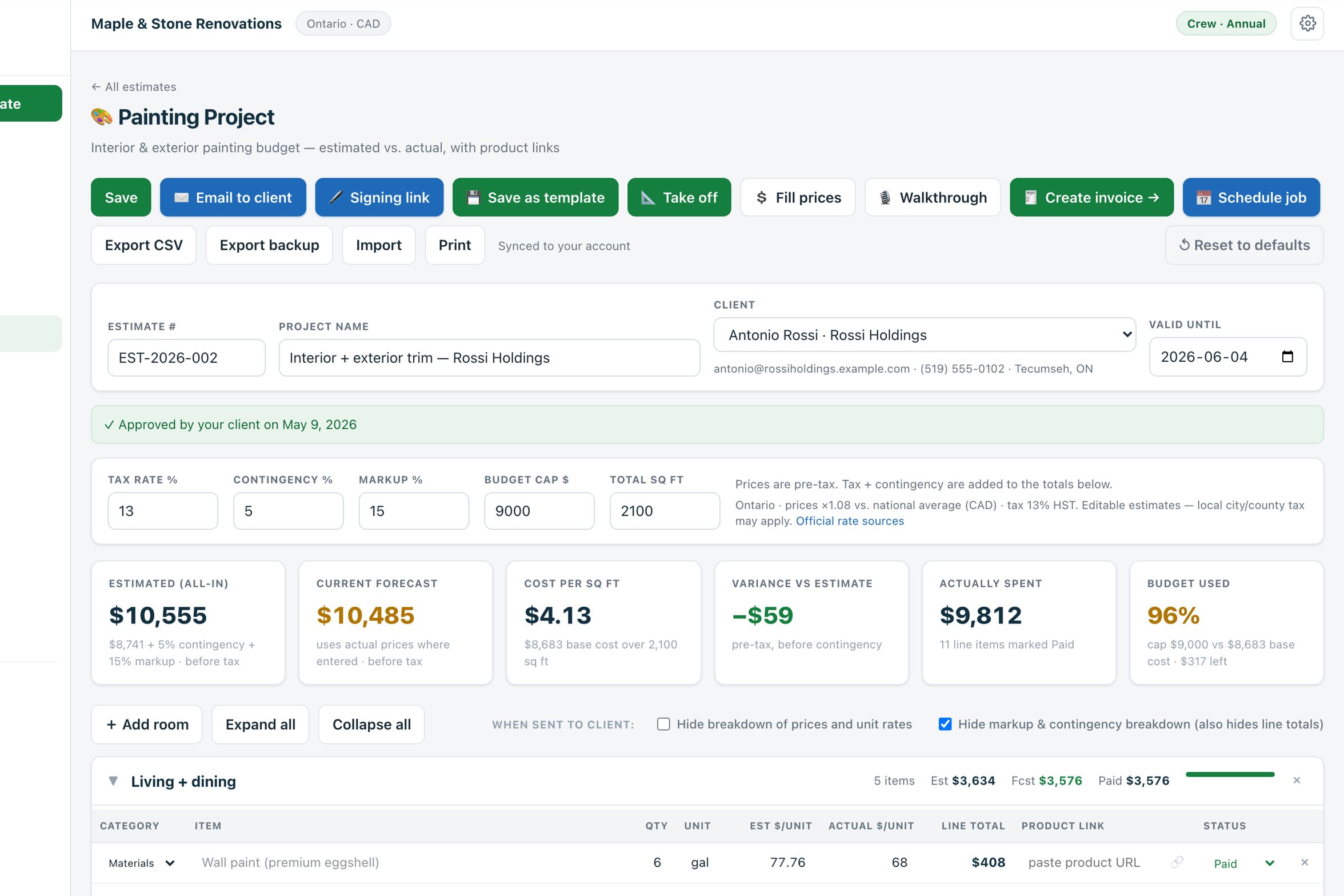
Maple & Stone Renovations· live demo account Approved
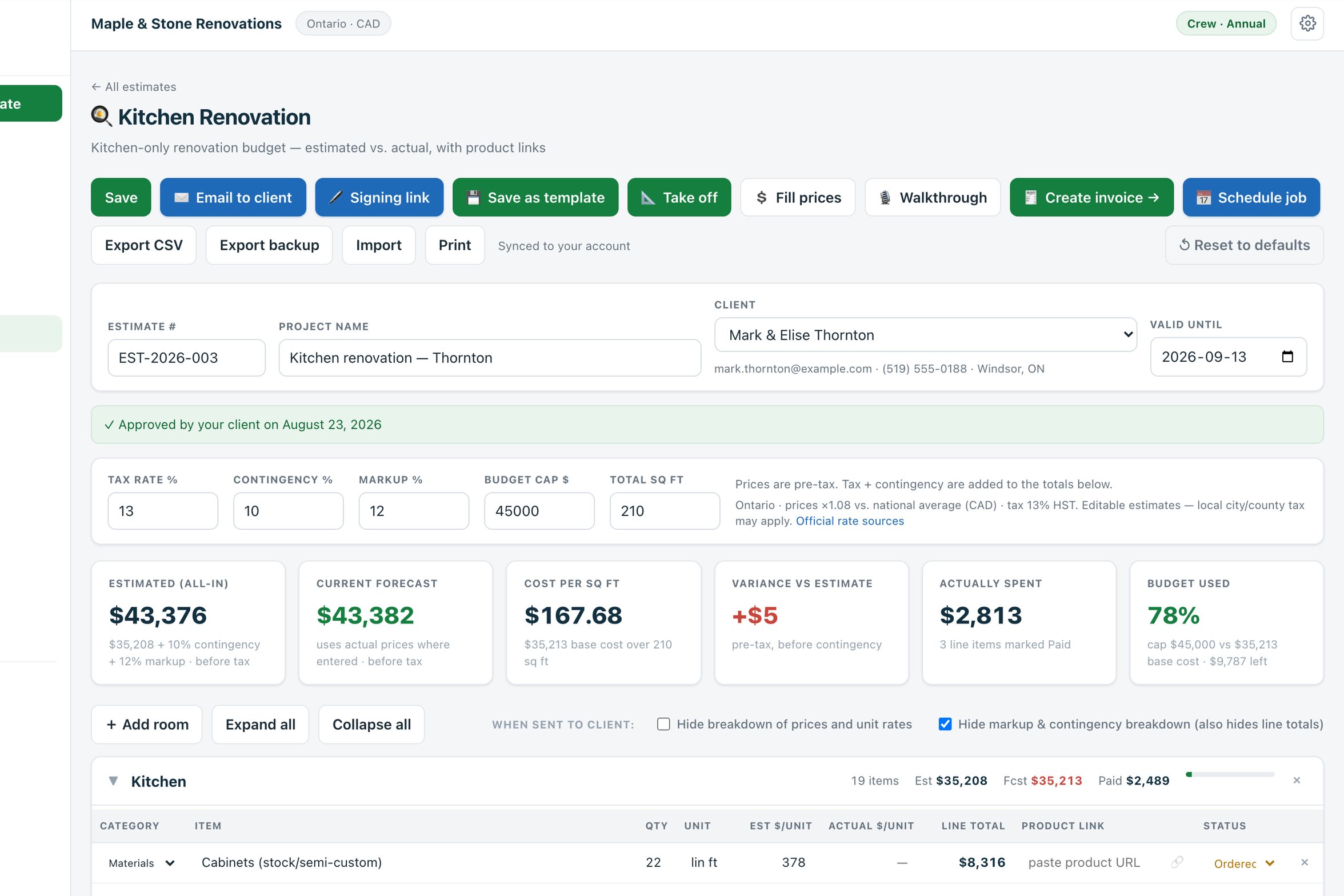
Kitchen renovation — ThorntonOntario · prices ×1.0813% HST
Cabinets (stock/semi-custom)22 lin ft × $378$8,316
Countertop — quartz42 sq ft × $102.60$4,309
Flooring — porcelain tile210 sq ft × $8.64$1,814
Tile + flooring install210 sq ft × $12.96$2,722
Electrical1 lot$2,376
+ 14 more lines — appliances, plumbing, permit…
Estimated, all-in$35,208 across 19 lines + 10% contingency + 12% markup, before tax$43,376

What happened to it next

ClientMark & Elise Thornton · Windsor, ON
EstimateEmailed EST-2026-003
Client saidApproved the day after it was sent
InvoiceINV-2026-014, built from the estimate
Deposit$22,000 recorded · 50% deposit
QuickBooksSynced

Figures from the Thornton kitchen in the live demo — a made-up renovation company, the real app. Open this estimate →

Ready-made templates for the jobs you quote

60+States and provinces with regional prices and tax built in
9Ready-made estimate templates, plus a blank sheet
14Days free on any paid plan — no card to start
$0Taken from your card payments — Stripe’s own fee only
10People on one Crew plan, at one flat price

What you do, what it does

You walk the job.
Estiquik does the paperwork.

No onboarding call, no setup weekend, nobody to wait on. Pick your region, open a template and price a real job today.

What you do

  • Walk the job — or open the drawings
  • Measure off the plan, or talk the walkthrough into your phone
  • Open the template for the job type
  • Change the quantities and any price you know better
  • Press send

What Estiquik does

  • Fills in starting prices scaled to your province or state, and the tax
  • Turns takeoff quantities into estimate lines
  • Emails the estimate with a Review & sign button on it
  • Turns the approved estimate into an invoice in one click
  • Adds a card-payment link through your own Stripe account

What lands in your account

  • A signed estimate, with the signature block printed on your copy
  • An invoice with a pay-by-card button
  • Payments recorded on the invoice as they arrive
  • Every client, estimate and invoice in one place
  • A CSV or JSON export of it all, whenever you want one
Live demo — a made-up renovation company, the real app No sign-up · nothing is emailed or charged · runs in your browser

See it working

The real app. Sample jobs.
Click anything.

Maple & Stone Renovations is made up; the software isn’t. It’s the same Estiquik you’d sign up for, with two years of sample jobs already in it — and anything you change stays in your own browser.

estiquik.com/demo/projects.html Open full screen ↗

Load the live demo here

The whole app opens in this window, signed in as a made-up contractor with two years of sample jobs in it. No sign-up, no email.

Or open the demo’s start page in its own tab ↗

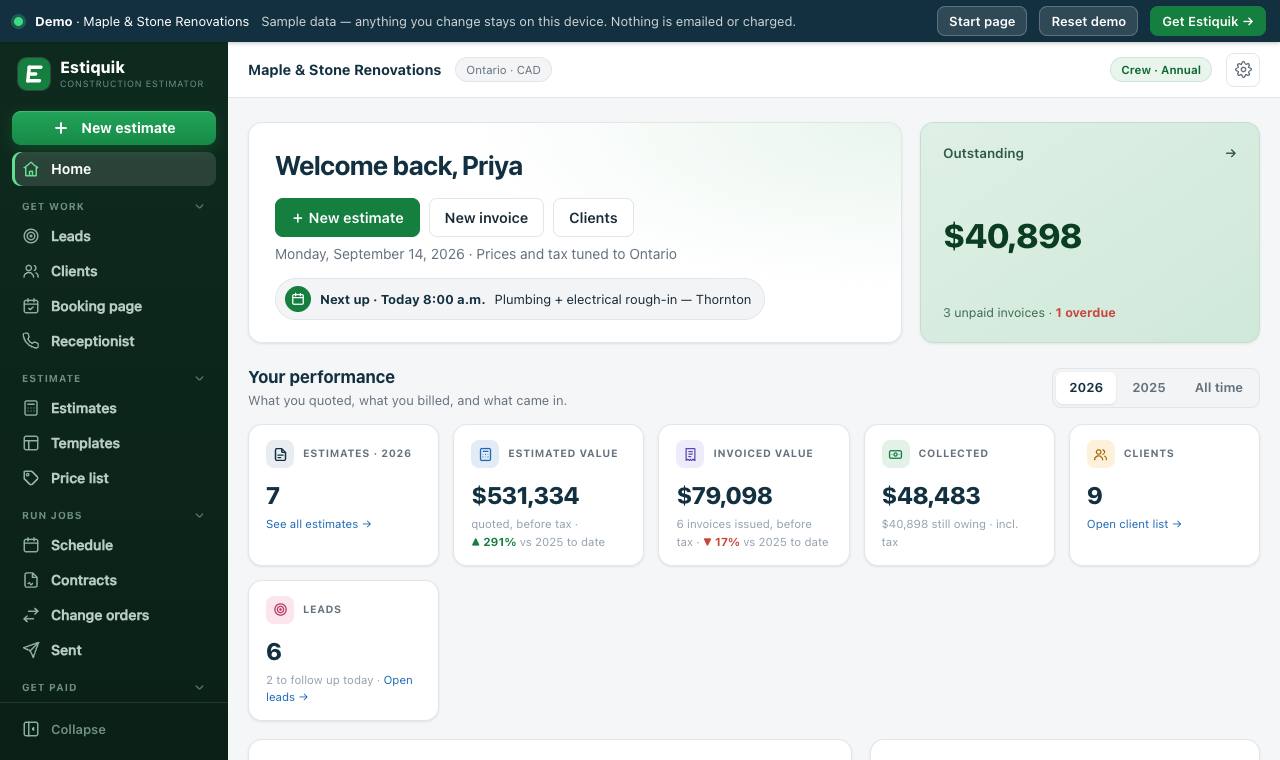
The Home dashboard: billed against collected, what’s still outstanding, the next job up and the latest estimates.

Start a free trial with your own jobs

The demo never leaves your browser — nothing you type is sent anywhere, and Reset demo in its top bar puts the sample jobs back.

Set up for the job you’re quoting

One app,
priced for the work you do.

The first thing you pick on a new estimate is the kind of job. Its template arrives with the rooms and lines already listed and priced for your region — and the demo has a finished estimate for each of these.

  1. Step 1

    Walk it, or open the drawings

    Talk the walkthrough into your phone, or attach the plan and measure the cabinet run and the counter straight off it.

  2. Step 2

    Start from the Kitchen template

    Twenty lines already listed — cabinets, quartz, backsplash, appliances, plumbing, electrical — each priced for your region.

  3. Step 3

    Send it for a signature

    Emailed with your logo, your payment terms and the drawings attached. The client signs from their phone.

  4. Step 4

    Invoice the deposit

    One click turns the approved estimate into an invoice — or a payment schedule bills it in stages.

Kitchen · demo estimateEST-2026-003
The Thornton kitchen estimate open in Estiquik

The job

Kitchen renovation — Thornton

19 lines, $43,376 all-in before tax. Approved, invoiced, and a $22,000 deposit recorded.

On the Kitchen template

  • Cabinets by the linear foot, the countertop and backsplash by the square foot
  • Fridge, range, dishwasher and hood as lines of their own
  • Every starting price is scaled to your region, and every one stays editable

How it works

Your first estimate today.
No sales call. No setup fee.

There’s no onboarding session to book and nothing to import first. Sign up, pick your region and price a real job the same afternoon.

Minute 1

Pick your region

Your province or state sets the starting prices and the tax rate. You can override either on any estimate.

Minute 2

Open a template

Nine job types or a blank sheet — or record the walkthrough, or take the quantities off the plan.

Same day

Send it for a signature

Your logo, your terms, the drawings attached and a Review & sign button. The client signs from their phone.

Every job after

Invoice it, get paid

One click to the invoice, a pay-by-card button on it, and the payment recorded on it when the money lands.

Coming from Joist or Jobber? Bring your clients and invoices across with the CSV import — it’s on every plan, Free included.

What it does

Measure it, price it, sign it.
Then get paid for it.

Eight jobs the office used to do at the kitchen table at night. Pick one.

On Pro and Crew

Measure off the drawing, not off memory.

Attach the plan and set the scale by clicking a dimension you trust. Then trace: floors and ceilings as areas, wall runs as lengths, fixtures as counts. Each measurement lands on the estimate with the quantity filled in and the price left for you — a takeoff measures the job, it doesn’t price it.

Waste and pack sizes turn what you measured into what you’d order. Works on multi-sheet permit sets, each sheet scaled on its own.

How the takeoff works →
Drywall — rec roomArea
33 sheets
= what you’d order, not 952 sq ft measured
78 lin ft run × 8′ high · plus ceiling · less the door & window · rounded to 4×8 sheets
Pot lightsCount
14 ea
every tagged fixture counted in one click, named from the sheet’s legend
An example takeoff, not a customer’s job.

Your other options

The spreadsheet, the all-in-one,
or the one built for quoting.

Estiquik does one job properly: pricing the work off the drawings and getting paid for it. Here’s where that helps — and where it doesn’t.

Your spreadsheetAll-in-one field serviceEstiquik
Draft an estimate from a walkthroughYou start from a blank pageNot offeredRecord it; get rooms and lines to price
Measure quantities off a PDF planScale rule and a notepadRarely, or a paid add-onBuilt in, straight to line items
Regional material & labour pricingYou research itUsually blank60+ regions built in
Renovation-specific templatesBuild your ownGeneric line items9 included, plus your own
Tax by state or provinceManualVaries by planFilled in, editable
Estimate → invoiceRetype itYesOne click
Estimated vs actual, line by lineIf you build itHigher tiers onlyPer line, per room
Client e-signaturePrint, sign, scanUsuallyFrom their phone, with an audit trail
Client card paymentsNoOften with platform feesYour own Stripe — no cut taken
Receipts & job expensesA shoebox of paperHigher tiers onlySnap, file to the job, report
Contracts & change ordersA Word doc and a handshakeAdd-ons or higher tiersDrafted from the estimate, signed, tracked
Client reminders & follow-upsYou remember, or you don’tHigher tiersJob, estimate & overdue-invoice emails
Whole team, one accountEmailing files aroundPriced per user10 people, one flat price
Dispatch & GPS crew trackingNoYesNot our focus — a job calendar, no GPS
Setup before your first quoteHoursDays, often onboarding callsMinutes
Typical monthly cost$0 + your evenings$100–$400+Free, or from CA$24.99

All-in-one figures are typical published field-service price ranges, not a quote from any one vendor. Comparing a specific app? vs Joist · vs Jobber · vs Houzz Pro · vs Buildxact

What it’s worth

Real numbers.
Your own.

Move the sliders to match your business. No sign-up, no email — the sum runs in your browser.

Your business

Your numbers

Count every quote, won or lost.
12
Walkthrough notes to finished PDF.
90 min
Your billable rate, or what you’d pay to buy the hour back.
$75
Used to size the margin you’re leaving on the table.
$24,000
Your assumption — start conservative at 2%.
2%
Time you get back, year one
$0Your own hourly rate applied to the hours Estiquik takes off your estimating — before a single pricing improvement.
Hours given back per year0 hrs
Evenings you stop losing0
Estiquik Starter, annual plan−CA$250
Plan pays for itself in—
Separate upside — your assumption, not our promise
$0
Margin on a year of won work if tighter pricing gains you 2%. Assumes roughly a third of estimates convert. It’s shown apart from the number above because we can’t stand behind it — you set it.

Time saved assumes Estiquik gets you to a finished estimate in about 15 minutes from a template, versus the time you entered. Pricing data is a researched starting point, always editable, and never tax advice.

Where we’re careful

No made-up reviews.
Just what it won’t do.

Software that touches your prices and your clients’ money should be judged on what it refuses to do, not on a logo wall. These are rules in the product, not settings to remember.

Never prices the job for you

The AI estimator drafts the scope and leaves every price blank. Template prices are a researched starting point for your region, and every one of them is yours to change.

Never sends an unchecked draft

Lines the AI drafted stay marked, and the estimate can’t be emailed or sent for signature until you’ve confirmed them.

Never takes a cut

Client card payments go through your own Stripe account. Estiquik adds nothing on top of Stripe’s fee, and card details never touch our servers.

Never holds your data hostage

Export estimates to CSV or JSON whenever you like. If a subscription ends, the account drops to Free — your estimates stay where you left them.

You won’t find testimonials, logo walls or customer counts on this page. Everything here is something the app does today. Judge it on the live demo — then on a job you’re quoting. Security details · Privacy policy

Pricing

14 days free on any plan.
Then from CA$24.99 a month.

Every paid plan starts with 14 days free, no card. Starter gives you unlimited estimates, every template, sending and invoicing. Pro adds plan takeoff, the AI estimator, expenses, contracts, change orders and QuickBooks. Crew puts your whole team in one workspace. Not ready for a trial? Free keeps three estimates, with no time limit.

Underprice a single $24,000 kitchen by just 3% and you’ve given away $720 — more than two years of Estiquik Starter.

Free

$0forever
No card, no trial clock
  • Up to 3 estimates, built from a blank sheet
  • Client records
  • Your region’s tax rate, worked out for you
  • Print or save a PDF to hand over
  • Emailing, signing links and invoicing
  • The nine ready-made templates
  • Your own price list
  • AI estimator & plan takeoff
Start free

Starter

$15.83/mo billed annually
  • Unlimited estimates & line items
  • All nine estimate templates, plus custom estimates & one-off invoices
  • Email the estimate, take an e-signature, invoice it
  • Regional pricing for 60+ states & provinces
  • Invoicing with automatic tax
  • Your own price list — keep your rates once, then fill an estimate’s unit prices in a click, or import your supplier’s CSV
  • Progress billing — a payment schedule on the estimate, one invoice per stage, optional holdback
  • Client records (CRM) and a Leads pipeline from enquiry to won job
  • Card payments on invoices — via your own Stripe
  • CSV & PDF export
Start 14-day free trial
MOST POPULAR

Pro

$25.00/mo billed annually
  • Everything in Starter
  • AI estimator — record a walkthrough and get a draft estimate back: rooms, line items and quantities, ready to price. 10 drafts a month, and you can buy more if you need them
  • Plan takeoff — measure areas, wall runs and fixture counts straight off a PDF drawing, and send the quantities to the estimate
  • Expense & receipt tracking, with reports
  • Contract drafting, e-signature & signed-copy library
  • Change orders — priced, e-signed, and tracked against the estimate
  • Sent history — every emailed document archived
  • Automatic client emails — day-before job reminder, estimate follow-up, overdue-invoice reminders with a pay link
  • Public booking page — homeowners book a site visit that lands on your schedule
  • QuickBooks Online sync
  • Priority support
Start 14-day free trial

Crew

$58.33/mo billed annually
  • Everything in Pro, with 30 AI drafts a month across the team
  • Up to 10 people in one shared workspace
  • Same clients, estimates, invoices & expenses for the whole team
  • Invite by email — members use their own login
  • One subscription, no per-user math
Start 14-day free trial

Add the AI receptionist

A dedicated number that answers your phone when you can’t — it finds out what the caller needs, books a site visit into your schedule, and emails you the summary. It never claims to be a person. Add it to any paid plan — same price whichever plan you’re on.

100 minutes$29a month
300 minutes$69a month
650 minutes$129a month

Charged on top of your plan. Calls are counted in whole minutes, like your phone bill. Run out and it simply stops answering — calls ring through to your own phone, and nothing is ever billed as overage. Hear a demo call, or book a live one.

Nothing to lose. 14 days free on any paid plan, no credit card to start, cancel in two clicks, and every estimate exports to CSV or JSON on your way out.

Weighing up Pro against Crew, or want to see the takeoff on your own drawings first? Book a 30-minute demo — bring a plan set from a job you’re quoting.

Before you ask

The questions contractors
actually ask.

There’s more in the help centre and on the pricing page.

Still have a question?

Email us — it reaches the people who build the software.

support@estiquik.com
Book a 30-minute demo
01Where do the starting prices come from — can I trust them?

Each template ships with national-average line-item prices, then scales them by a regional cost index for the state or province on your account. Treat them as a researched starting point, not a quote. Every price stays editable, and your own edits become your new baseline — so the tool gets more accurate to your business with every job you price.

02I already have a spreadsheet that works. Why switch?

Because the spreadsheet doesn’t know what a quartz countertop costs in your market this month, doesn’t fill in your tax rate, doesn’t turn itself into an invoice, and doesn’t tell you which lines came in over budget. Run the calculator above with your own numbers — if it doesn’t clear the CA$24.99, don’t switch.

03How long until I’m actually using it?

Minutes. There’s no onboarding call, no data import, and no setup fee. Pick your region, open a template, and price a real job. Most people have a client-ready PDF before the trial is an hour old.

04Is there a free plan?

Yes, with no time limit and no card. Free keeps up to three estimates, built from a blank sheet, with your client records and your region’s tax rate worked out for you. You can print them or save a PDF to hand over.

What Free doesn’t do is send: emailing the estimate, the signing link and invoicing are on Starter, along with the nine ready-made templates and unlimited estimates. Plan takeoff is on Pro. If a trial or a subscription ends, the account drops to Free rather than locking — your estimates stay reachable.

05Is the tax rate right for my area?

We fill in the base state or provincial rate automatically. Many places add city or county tax on top, and rules on whether labour is taxable vary, so confirm your local rate — you can override both the rate and the label on any estimate or invoice. This is a calculation tool, not tax advice.

06What happens when the client adds work mid-job?

Draft a change order: it links to the original estimate, prices the extra work (or a credit) line by line with tax, and goes out by email with a Review & sign button (or print for a wet signature). Signing it approves it, and signed changes roll into a running revised contract value — the original estimate plus every signed change — so the final invoice is never a surprise, and “we discussed it on site” never becomes a dispute.

07Can I just record a walkthrough instead of typing an estimate?

Yes — that’s the AI estimator. Press record and talk through the job; Estiquik writes it down and drafts the rooms, line items and quantities, with what it assumed, what’s excluded, and what to ask the homeowner. Add photos and measurements if you have them. Every line comes back with the price blank for you to fill — it removes the blank page, it doesn’t price the job or send it to anyone. It’s on Pro and up, with a monthly allowance.

08Can it measure quantities off my drawings?

Yes — that’s the takeoff, on Pro and Crew. Attach a PDF plan, set the scale by clicking a dimension you trust (or take the one the sheet states), then trace areas for flooring and ceilings, runs for walls and trim, and click the fixtures to count them.

Give a wall run a height and it becomes square feet of drywall; set it to one side and it’s the insulation; leave the height off and it’s the baseboard — measured once. Add a depth to an area and it’s concrete in cubic yards. Waste and pack sizes turn the measured figure into what you’d actually order, and every item lands on the estimate with the quantity filled in and the price left blank.

On a drawing with text tags, one click counts every receptacle, alarm or door on the sheet and names the item from the drawing’s own legend. Scanned or photographed plans work for measuring, but have no text to read, so those get counted by hand.

09Am I too small — or too big — for this?

Neither. Estiquik works the same whether you’re a solo renovator pricing one bathroom or a company quoting whole-house builds, and you can register as a business or an individual. There’s no per-user pricing to punish you for growing.

10What happens to my data if I cancel?

You keep it. Estimates export to JSON or CSV at any time — take a backup before you cancel and nothing is stranded. We’d rather you leave clean than feel trapped.

11Does it work outside the US and Canada?

The regional pricing and tax data covers the United States and Canada today. You can still use every template anywhere by entering your own prices and tax rate manually — you just won’t get the automatic regional scaling.

12Does it sync with QuickBooks?

Yes, on Pro and Crew. Connect your QuickBooks Online company from Integrations and your clients, invoices, and payments flow across automatically as you save them — no re-entry, no month-end reconciliation scramble.

13Can my clients pay invoices by card?

Yes. Connect your own Stripe account once (Integrations → Stripe payments), then any invoice can carry a card payment link — or go out as an email with a Pay button on it. The money settles to your Stripe account directly; Estiquik adds nothing on top of Stripe’s standard processing fee, and the payment records itself on the invoice the moment your client pays.

14Will it chase unpaid invoices and quiet estimates for me?

Yes, on Pro and Crew, by email and in your business name with replies to you. An emailed estimate that isn’t approved after three days gets one follow-up with the sign button still on it. An emailed invoice that passes its due date with a balance gets a reminder the next day and one more a week later, each carrying a fresh pay-by-card link when Stripe is connected. Clients of scheduled jobs hear from you the evening before. Every email has a “stop reminders” link, you can switch each kind off on the Account page or per client, and nothing ever goes to a client whose estimate was approved or whose invoice is paid.

15Can something answer my phone when I’m on the tools?

Yes — the AI receptionist. You get a dedicated number and forward your own phone to it, so calls you don’t pick up get answered instead of going to voicemail. It finds out who’s calling and what they need, books a site visit from your real availability, creates the client and the lead, and emails you the summary and the full transcript. It never quotes a price, never promises a date, and never claims to be a person. $29 a month for 100 minutes on any paid plan, $69 for 300, $129 for 650 — and if you run out it stops answering rather than charging you overage.

16Can homeowners book a site visit with me online?

Yes, on Pro and Crew. You get a public link — estiquik.com/book/your-name — for your website, Instagram bio and Google Business Profile. A homeowner picks a time from the hours you set, gives the address and describes the job. It lands on your schedule as a site visit, they’re added to Clients, they get a confirmation and the evening-before reminder, and you get an email with what they wrote. Paste your own calendar’s private iCal address and anything you’re already busy with is never offered.

17Can I track job expenses and receipts?

Yes, on the Pro plan. Photograph receipts on site — they compress on your phone before upload, attach to expenses tied to a client, estimate, or invoice, and carry HST/sales tax as its own reclaimable field. Reports break spending down by category, client, and month, with CSV export for your accountant.

18Can I bill a job in stages — deposit, mid-project, completion?

Yes, on every plan. Add a payment schedule to the estimate (50 / 50, 30 / 40 / 30, or your own stages) and it prints on the estimate so the client agrees to it up front. Each stage becomes its own progress invoice showing the contract value, what was invoiced before, this stage’s share and what’s left — with its own due date, pay link and overdue reminders. Set a holdback and it’s kept back from every stage and billed as a final release when the job is done.

19Can clients sign estimates and contracts electronically?

Yes — estimates on Starter and up, contracts and change orders on Pro. Email the document with a Review & sign button, or copy the signing link and text it. The client reads the exact document you sent, draws or types a signature on their phone, and you’re emailed the moment they do. The signature block — name, email, date and time, IP address and a fingerprint of the document — prints on your copy from then on. Change orders approve themselves when signed. No account or app needed on their side, and you can still print for a wet signature.

20Does Estiquik track leads?

Yes, on every plan. Leads is a simple pipeline — new enquiry, contacted, site visit booked, estimate sent, won or lost — with a follow-up date on each one, the source it came from, and notes. Bookings from your public booking page land in it automatically. One click converts a lead to a client, books the site visit or starts the estimate. Follow-ups are yours to make; Estiquik doesn’t send automated emails to leads.

21Can my whole team work in one account?

Yes, on the Crew plan. Invite up to 10 people by email — each gets their own login into your workspace, working on the same clients, estimates, invoices, and expenses. One flat subscription, no per-user pricing. Billing, payment connections, and invites stay with the account owner.
Ready when the next job is

Your next estimate
could take fifteen minutes.

Start your 14-day free trial, price a real job today, and see what it looks like in the client’s inbox.

14 days free · No credit card · Cancel in two clicks

Start free trial — no card required
14 days free · Cancel anytime