The estimate the client approved already has every line, the tax rate for your region and the client's details on it. Estiquik's invoice is that estimate with a number, a due date and a Pay button — not a second document you retype. One-off invoices for the small jobs, progress invoices for the long ones, and every payment recorded against the balance.
Every invoice is an ordinary Estiquik document: it prints, it emails with a sent copy on file, and it exports.
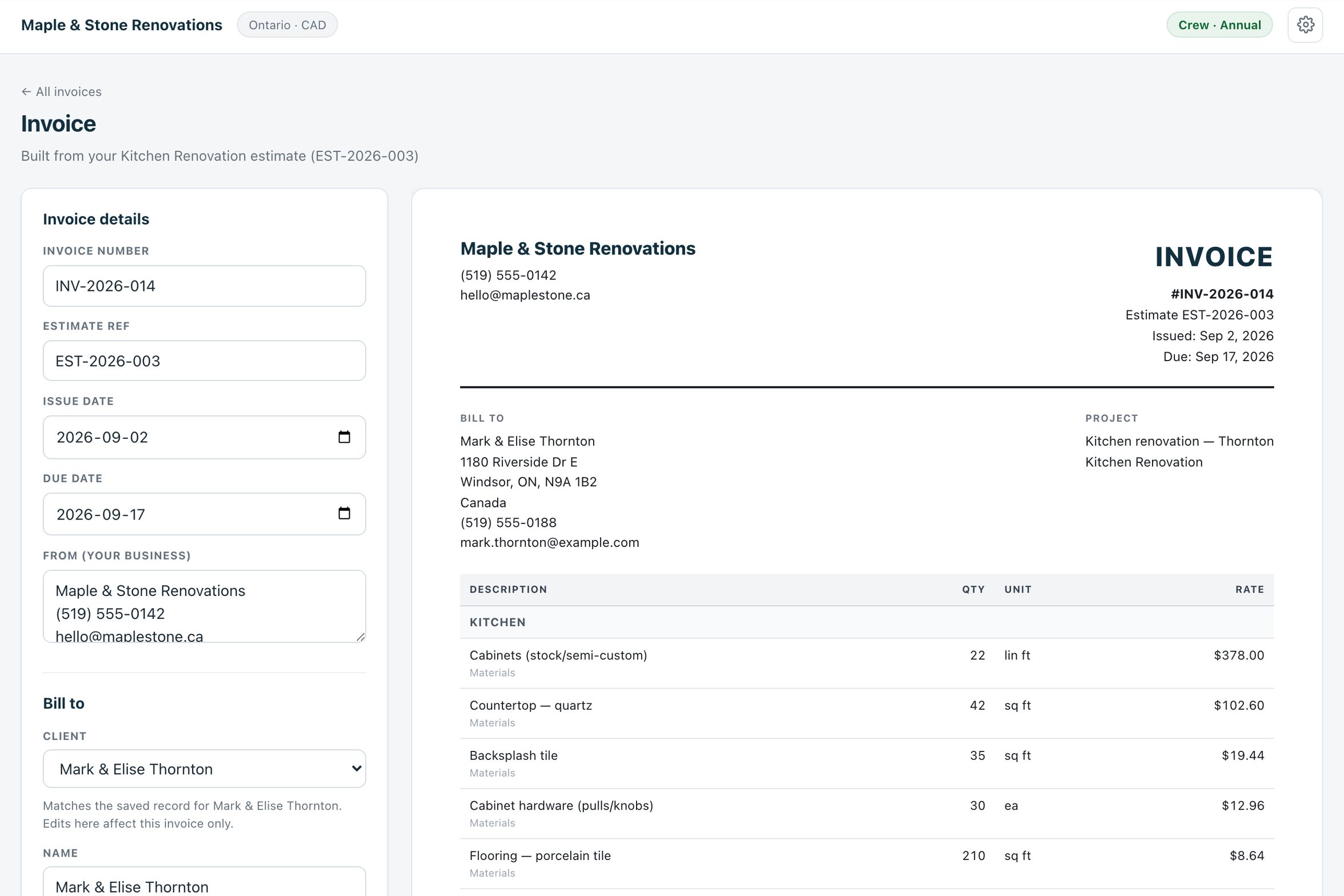
Open the estimate and create its invoice. Line items, client, region and tax carry over; markup, contingency, discount and tax are yours to adjust on the invoice without touching the original estimate.
Start from the Invoices page for the repair, the callback or the deck re-stain that never had an estimate. Pick the client, type the lines, send.
Put a payment schedule on the estimate — deposit, draws, completion, optional holdback — and each stage becomes its own invoice with its own due date and pay link.
See progress invoicing →Connect your own Stripe account once and every emailed invoice carries a Pay by card button. The money lands in your Stripe account, the payment records itself on the invoice.
Record cash, cheque, card and e-Transfer payments by hand, each as its own record with a date and a memo. The invoice shows the running total paid and the balance due.
On Pro, the day after an emailed invoice passes its due date with a balance owing, the client gets a reminder from your business name — with a fresh pay link for exactly the balance — and one more a week later. Then it stops.
Nothing is retyped between the estimate and the money.
The client approves the estimate from the email or signs it from their phone. Name, time and document fingerprint are recorded on the estimate.
Press Create invoice. The lines, the client and the tax rate arrive on the invoice; change what needs changing, set the due date, add a note about e-Transfer if that is how your clients pay.
Email it. The client sees the invoice with a Pay by card button if Stripe is connected, and a sent copy stays on file with the job.
Card payments record themselves. Cheques, cash and e-Transfers you record in a click. The balance updates, job costing counts it, and QuickBooks gets the payment on Pro.
Invoices import too: bring a Joist, Jobber or QuickBooks invoice export in through Import CSV, clients first, and each invoice lands on the right client record.
Estiquik does not sit between you and the money. You connect your own Stripe account; the charge is made directly on it.
Starter includes unlimited invoices. Vendor prices below were read from their own pricing pages on 3 September 2026, in US dollars, monthly with no commitment.
| Product | Monthly | What that buys |
|---|---|---|
| Estiquik Starter | $19.99 | CA$24.99 · unlimited estimates and invoices, progress billing, card payments via your Stripe, e-signature. Reminders and QuickBooks on Pro at $29.99. |
| Joist | Free, Pro $17, Elite $32 | Free tier capped at five documents a month. Card payments through Joist Payments: 3.49% + 49¢ in the US, 2.9% + 30¢ in Canada. |
| Jobber | Core $49 | One user; $29 for every extra user. Automated reminders and QuickBooks Online start on Connect at $139. |
Prices can change at any time; the comparison pages for Joist and Jobber carry the full tier tables and their dates.
It is the estimate, carried forward, with payments recorded against it. It is not an accounting system: there is no ledger, no bank feed, no aging report beyond the invoice list and job costing. For the books, the Pro plan pushes clients, invoices and payments into QuickBooks Online.
Emails go out from your business name through Estiquik's sender, with a 50-emails-a-day allowance per account that the automatic reminders share. An invoice with no due date is treated as due seven days after it was emailed.
No. Invoices from the Invoices page start blank — pick the client, add lines, send. Invoices from an estimate carry the estimate over, which is where the time saving is.
Yes, as a starting point. The invoice begins with the estimate's markup and contingency percentages and you can change either on the invoice without affecting the original estimate.
You connect your own Stripe account from the Integrations page. Emailed invoices then carry a Pay by card button; the client pays, the charge is made directly on your Stripe account at Stripe's standard rate, and the payment is recorded on the invoice automatically. Estiquik adds no fee and never holds the money.
Yes. Record payment takes an amount, a date and a method — cash, cheque, card, e-Transfer or other. Each payment is its own record, so a deposit now and the balance later both show, with the running total and what is left.
On Pro and Crew. The day after an emailed invoice is past due with a balance outstanding, the client gets one reminder from your business name with a fresh pay link for the exact balance; a week later, one more; then it stops. Recording a payment stops it, and any client can be excluded.
On Pro. Clients, invoices and recorded payments push to QuickBooks Online automatically as you save them. It is one-way, and QuickBooks Desktop is not supported. Details on the QuickBooks page.
Starter, at $19.99 a month or $199.99 a year (CA$24.99 / CA$249.99), with unlimited invoices. The Free plan builds three estimates and prints them but does not send or invoice. The 14-day trial needs no card.
Fourteen days of every feature, no card. Connect Stripe once and the Pay button is on every invoice after that.