◆ On Pro · $29.99 a month (CA$34.99) · QuickBooks Online only

Estimates here, the books in QuickBooks.

Your bookkeeper wants every invoice and every payment in QuickBooks Online. You want to write estimates and invoices in a tool built for renovation work. Estiquik does the second and pushes the results into the first: connect your company once, and clients, invoices and payments sync as you save them. Nothing to export, nothing to retype.

No card to start Automatic on save Disconnect any time, nothing deleted
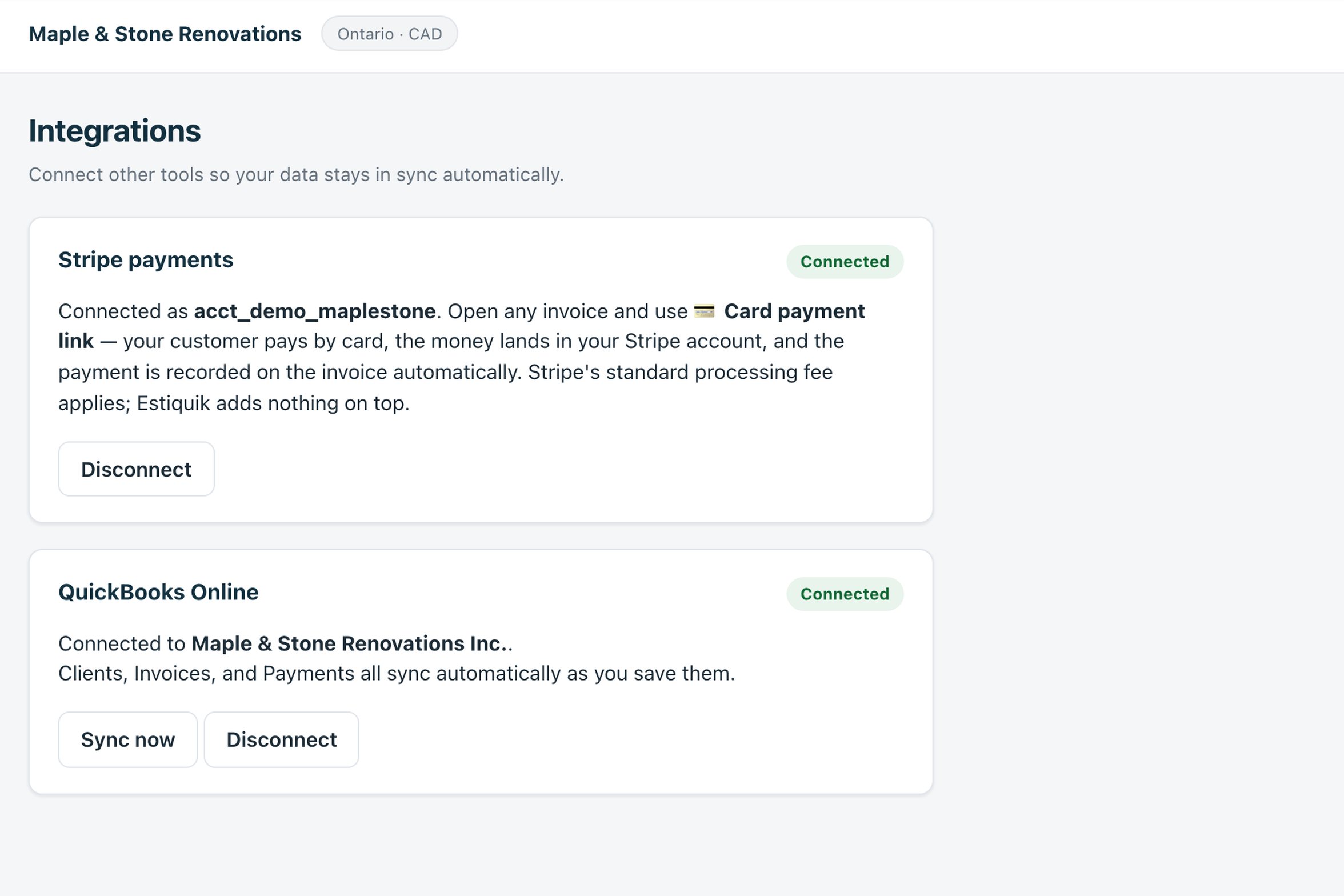
The Estiquik Integrations page with Stripe payments and QuickBooks Online both connected, showing the company name and a Sync now button
Integrations in the live demo
Three records, one direction

What syncs to QuickBooks Online

Estiquik pushes; QuickBooks receives. Changes made in QuickBooks do not flow back, so Estiquik stays the place you write the documents and QuickBooks stays the place you keep the books.

👤

Clients become Customers

Name, company, email, phone and address. Edit the client in Estiquik and the customer updates; delete one and it is made inactive in QuickBooks rather than deleted, because QuickBooks keeps customers with history.

Duplicate names are caught, not doubled
🧾

Invoices become itemised Invoices

Every line, the tax, the due date and the invoice number, as an itemised QuickBooks invoice on the right customer. Progress invoices sync as each stage is billed. A deleted invoice is voided, not lost.

Same number in both systems
💳

Payments land on the invoice

A card payment through your Stripe, or a cheque or e-Transfer you record, becomes a QuickBooks payment applied to that invoice. Delete a payment in Estiquik and it is voided in QuickBooks.

No unapplied payments to chase

Automatic, on save

There is no sync button to remember. Saving a client, invoice or payment pushes it. Sync now exists for the backlog you created before connecting.

And for the day the connection lapses
🔌

Connect with your Intuit login

Press Connect to QuickBooks, sign in to Intuit, approve, and land back connected with the company name shown. Disconnect revokes the token; nothing already sent is touched.

Reconnect any time
🧮

Job costing stays in Estiquik

Estimate vs actual, expenses and receipts are Estiquik's; the ledger, payroll and bank feeds are QuickBooks'. Each does the half it is good at.

See job costing →

Connect to reconcile

How the sync works day to day

Four steps, one of which you do once.

STEP 1

Connect once

Integrations, Connect to QuickBooks, sign in to Intuit, approve. The Integrations page shows the company you connected. Press Sync now to push anything created earlier.

STEP 2

Work in Estiquik

Write the estimate, get it approved, create the invoice, record the payment — exactly as before. Each save pushes the record.

STEP 3

QuickBooks receives

The customer, the itemised invoice and the applied payment appear in QuickBooks Online within moments of saving, with the same invoice number.

STEP 4

Reconcile in QuickBooks

Your bookkeeper matches the payment to the bank feed in QuickBooks. Nothing about that step changes; there is simply less to enter first.

If a push fails — Intuit is down, the token expired — the record is marked and retried on the next save or Sync now. Nothing is silently skipped.

The details

What the connection does and does not touch

A QuickBooks integration is judged by what it does when things are deleted, duplicated or disconnected. These are the rules.

One-way, by designEstiquik pushes to QuickBooks. Edits made in QuickBooks do not come back, so there is one source of truth for each record: documents in Estiquik, books in QuickBooks.
Deletes become voidsA deleted invoice or payment is voided in QuickBooks, not removed; a deleted client is made inactive. Your accountant's history survives your housekeeping.
Nothing else is sentEstimates, expenses, receipts, change orders and contracts stay in Estiquik. Only clients, invoices and payments cross over.
Your credentials stay with IntuitThe connection is an OAuth token Intuit issues; Estiquik never sees your QuickBooks password. Disconnect from the Integrations page revokes it.
QuickBooks integration pricing

What it costs next to the estimating apps that sync

The sync is on Pro. Vendor facts below were read from their own pricing pages on 3 September 2026 (Buildxact on 7 September 2026), in US dollars.

ProductMonthlyWhat that buys
Estiquik Pro$29.99CA$34.99 · QuickBooks Online sync, job costing, expenses, change orders, contracts, plan takeoff. Annual $299.99 / CA$349.99.
JobberConnect, $139QuickBooks Online starts on Connect at $139 for one user, $199 for five.
JoistPro, $17QuickBooks Online on Pro and up.
BuildxactFoundation, $199Xero, QuickBooks Online and MYOB, per Buildxact's help centre.

The Jobber, Joist and Buildxact comparison pages carry the full tier tables and their dates.

Where it stops

What the QuickBooks sync is

Pick Estiquik if you…

  • Use QuickBooks Online and want to stop retyping invoicesEvery invoice and payment arrives on its own, with the same number.
  • Have a bookkeeper who lives in QuickBooksThey keep their workflow; the data is just already there.
  • Want estimating built for renovation, not a QuickBooks add-onPriced templates, takeoff, change orders — then the books.
  • Are moving from Joist or JobberImport their invoice export, connect QuickBooks, and the history is on the right customers.

Pick a different tool if you need…

  • QuickBooks DesktopNot supported. Desktop uses a completely different connection and there are no plans for it.
  • Two-way syncChanges made in QuickBooks do not flow back into Estiquik.
  • Expenses or bills pushed to QuickBooksEstiquik's expenses and receipts stay in Estiquik for job costing; enter bills in QuickBooks as you do now.
  • Xero, Sage or FreshBooksQuickBooks Online is the only accounting integration today.

A one-way push of three record types — clients, invoices, payments — from Estiquik into QuickBooks Online, automatic on save, with deletes turned into voids so the books stay auditable. It is deliberately narrow: it moves the records an accountant needs and leaves the estimating records where they belong.

The sync needs Pro. On Starter the Integrations page shows the Stripe connection, which every paid plan has, and a Pro badge on QuickBooks.

Before you ask

Questions contractors ask

Does Estiquik integrate with QuickBooks?

Yes — QuickBooks Online. Connect your company from the Integrations page and your clients, invoices and payments sync across automatically as you save them in Estiquik.

What exactly syncs, and in which direction?

Estiquik pushes to QuickBooks: clients become customers, invoices become itemised invoices, and recorded payments are applied to the right invoice. It is one-way; changes made directly in QuickBooks do not flow back.

Does it work with QuickBooks Desktop?

No, only QuickBooks Online. Desktop uses a completely different connection method that is not supported.

How do I connect it?

Integrations in the sidebar, Connect to QuickBooks. Sign in to Intuit, approve the connection, and you land back on Estiquik connected. Press Sync now afterwards to push anything you created before connecting.

What happens when I delete something?

A deleted client is made inactive in QuickBooks, a deleted invoice is voided and a deleted payment is voided. Nothing is hard-deleted on the QuickBooks side, so the history your accountant relies on is kept.

How do I disconnect?

Disconnect on the Integrations page. Syncing stops immediately, nothing already sent to QuickBooks is deleted, and you can reconnect at any time.

Which plan is the QuickBooks sync on?

Pro, at $29.99 a month or $299.99 a year (CA$34.99 / CA$349.99), with job costing, expenses, change orders, contracts and plan takeoff. The 14-day trial is Pro and needs no card.

Connect QuickBooks and stop retyping invoices

Fourteen days of Pro, no card. Connect once; every invoice and payment after that is already in the books.

Start free — no card required
14-day trial of Pro · Cancel anytime