◆ On Pro · $29.99 a month (CA$34.99) · 14-day trial

Job costing that compares the quote to the receipts.

Every contractor knows which jobs made money. Fewer can say how much, because the receipts are in the truck and the invoices are in another app. Estiquik puts the three numbers on one line per job — quoted, invoiced, spent — and the margin that falls out of them, with the receipts photographed and linked as you go.

No card to start Receipts photographed, tax tracked Exports to CSV
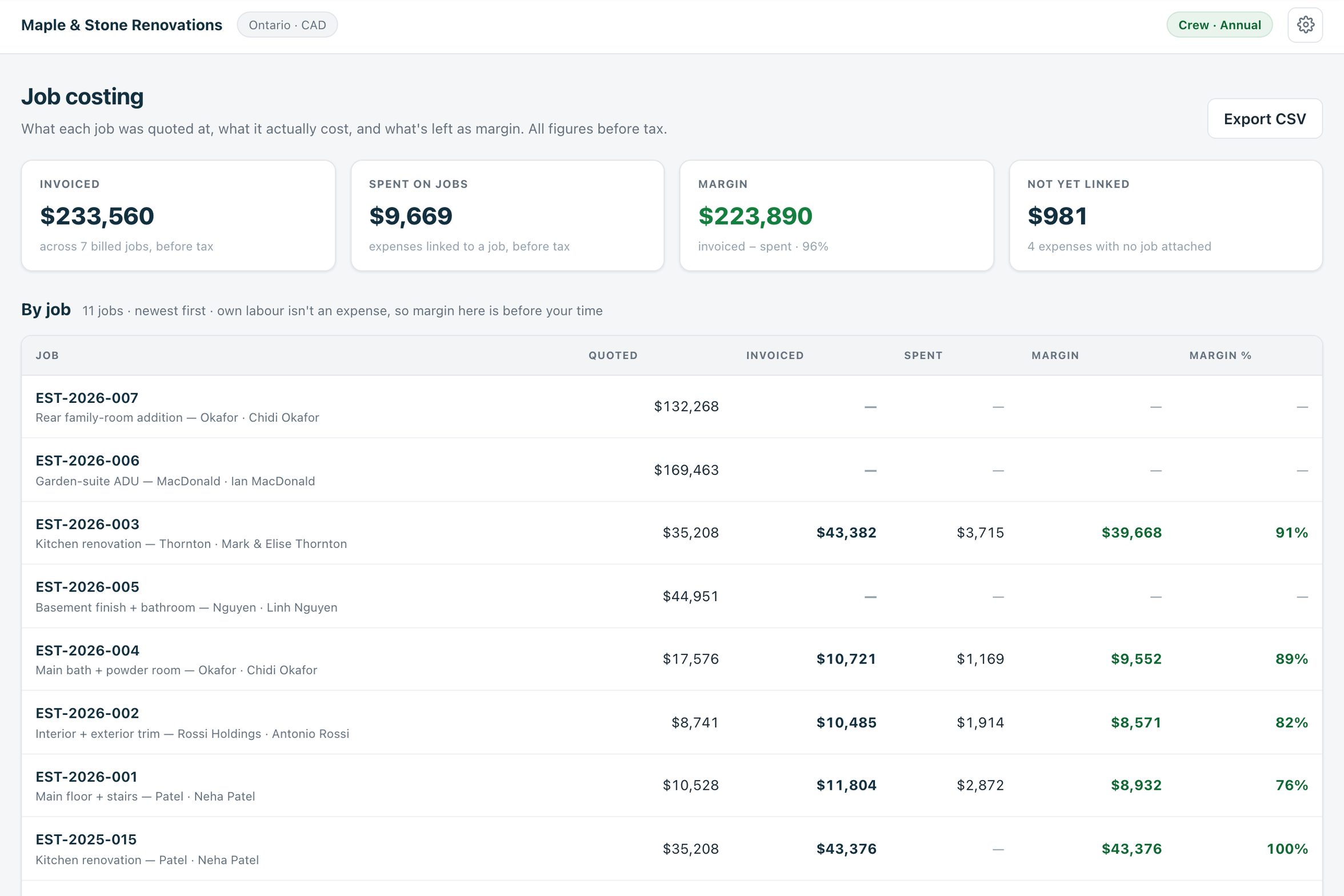
The Estiquik job costing page: totals for invoiced, spent on jobs and margin, then a table of jobs with quoted, invoiced, spent, margin and margin percent
Job costing in the live demo
Quoted, invoiced, spent, margin

What job costing shows

One page, every job, newest first. All figures before tax, so the margin is real margin.

📊

Per job: five numbers

Quoted from the estimate, invoiced from the invoices on it (progress stages included), spent from the expenses linked to it, margin, and margin percent.

Newest first, export to CSV
🧮

Totals across the business

Invoiced across all billed jobs, spent on jobs, margin, and the expenses not yet linked to any job — so the ones you forgot to assign are counted, not lost.

Not yet linked: 4 expenses
🧾

Expenses with receipts

Photograph the receipt, pick the vendor and category, link the estimate or client. Tax is its own field, so what you can reclaim is tracked, not buried in the total.

Billable or overhead
📑

An expense report

By category, client, month or payment method, with before-tax, tax and total columns — the report your bookkeeper actually asks for.

Fuel, tools, insurance, materials
🎯

Est $ and Actual $ on every line

On the estimate itself, each line has the template's starting price and the actual you paid once the quote or receipt is in. Actuals take over the totals as you enter them.

Estimated vs forecast vs spent
📐

Budget cap and cost per square foot

Set a budget on the estimate and watch the cap, the cost per square foot and the variance against the estimate update as actuals come in.

On the estimate, before the job ends
Receipt to margin

How the numbers get there

Nothing is entered twice. The estimate, the invoices and the expenses each contribute one number.

STEP 1

Quote

The estimate's total, before tax, is the quoted figure. It is the same estimate the client approved.

STEP 2

Invoice

Each invoice on the estimate — one, or a deposit and draws — adds to invoiced. Job costing counts a stage the day it is billed.

STEP 3

Spend

Add an expense from the phone at the counter: photo of the receipt, vendor, amount, tax, category, and the job it belongs to. Mark it non-billable if it is overhead.

STEP 4

Read the margin

Invoiced less spent, per job and across the business. Export it to CSV for the accountant, or push the invoices and payments to QuickBooks on Pro.

Own labour is not an expense unless you enter it as one, so the margin shown is before your own time. The page says so, because a 90% margin that ignores three weeks of your labour is not a 90% margin.

Expenses and receipts

What an expense carries

An expense is a small record, but the fields are the ones that matter at tax time.

The receiptA photo taken at the counter or a file added later. Stored with the expense, viewable from the job.
The tax, separatelyAmount before tax, tax and total. Set the rate per expense — an insurance premium at 0%, materials at HST — so the reclaimable tax adds up on the report.
The job and the clientLink to the estimate and it counts in that job's spent figure. Link only a client and it sits on their record. Link nothing and it shows under Not yet linked so you can fix it.
Category and methodMaterials, tools and equipment, fuel and vehicle, waste and disposal, insurance and your own; paid by card, debit, cash, cheque, e-Transfer or company account.
Job costing software pricing

What it costs next to the apps that gate job costing

Job costing, expenses and receipts are all on Pro. Vendor facts below were read from their own pricing pages on 3 September 2026, in US dollars.

ProductMonthlyWhat that buys
Estiquik Pro$29.99CA$34.99 · job costing, expenses and receipts, change orders, contracts, plan takeoff, QuickBooks. Annual $299.99 / CA$349.99.
JobberGrow, $199Job costing (timesheets × labour cost, unit costs, expenses) starts on Grow at $199 for one user; expenses alone start on Connect at $139.
JoistPro, $17Expenses and QuickBooks Online on Pro. No estimate-vs-actual job costing page.
BuildxactFoundation $199Job costing and purchase orders for builders; from buildxact.com/us/pricing, 7 September 2026.

The Jobber and Buildxact comparison pages carry the full tier tables and their dates.

Where it stops

What job costing in Estiquik is

Pick Estiquik if you…

  • Want to know the margin on each job, not just the bank balanceThree numbers per job and the margin that falls out.
  • Lose receiptsThe photo is taken when the receipt is in your hand, and the tax is recorded then.
  • Price from templates and want to correct themThe Actual $ column on each line is where next year's template rates come from.
  • Hand a clean report to a bookkeeperBy category or month, tax separated, CSV export.

Pick Jobber Grow or Buildxact if you need…

  • Timesheets and labour costed by the hourEstiquik has no clock-in. Your crew's time is a cost only if you enter it as an expense or a sub's invoice.
  • Purchase orders and committed costSpent means receipts and expenses entered, not POs raised.
  • Work-in-progress or percent-complete accountingJob costing is quoted, invoiced and spent to date — cash-basis, not WIP.
  • Payroll, bank feeds, a general ledgerThat is QuickBooks. Estiquik pushes invoices and payments to it on Pro and stops there.

A per-job comparison of what you quoted, what you invoiced and what you spent, drawn from documents you already keep in Estiquik. It is honest about its edges: figures are before tax, own labour is only counted if you enter it, and a job with no expenses linked shows a margin that is too good to be true — which is a prompt to link them.

Job costing, expenses and receipts need Pro. The expense report is on the same plan.

Before you ask

Questions contractors ask

What does the job costing page show?

Every job with an estimate, newest first: quoted (the estimate before tax), invoiced (all invoices on it, progress stages included), spent (expenses linked to it), margin and margin percent. Totals at the top cover invoiced, spent on jobs, margin, and expenses not yet linked to any job.

Does it count my own labour?

Only if you enter it. Own labour is not an expense by default, so the margin shown is before your time — the page says so. Enter a labour expense per job if you want it in the number.

How do I record an expense?

From Expenses, press New expense: vendor, date, amount with tax as its own field, category, payment method, the estimate or client it belongs to, and a photo of the receipt. Mark it non-billable for overhead like fuel or insurance.

What is the difference between Est $ and Actual $ on an estimate line?

Est $ is the template's starting price adjusted for your region. Actual $ is what you paid once you have a quote or a receipt. Once an actual is entered it is used in the totals, so the estimate shows estimated, current forecast and actually spent side by side.

Can I get the numbers out?

Yes. Job costing exports to CSV, the expense report groups by category, client, month or method, and on Pro invoices and payments push to QuickBooks Online. Estimates export on every plan.

Which plan is job costing on?

Pro, at $29.99 a month or $299.99 a year (CA$34.99 / CA$349.99), with expenses, receipts, the expense report, change orders, contracts, plan takeoff and QuickBooks. The 14-day trial is Pro and needs no card.
See the margin on the next job

Fourteen days of Pro, no card. Link the receipts as you go and the margin is there when the job closes.

Start free — no card required
14-day trial of Pro · Cancel anytime