◆ On Pro · 10 drafts a month (Crew 30) · never prices, never sends

Walk the house, talk, and get a draft estimate back.

The blank page is the slow part of estimating, not the pricing. Estiquik's AI estimator removes it: press record and talk through the job the way you would to your foreman — what is coming out, what is going in, rough sizes, what the homeowner asked for — add the photos and your measurements, and a draft estimate comes back with the rooms, the line items and the quantities. Every price is left blank for you, and nothing can be sent until you have looked at each line.

No card to start Record in the browser or upload a voice memo Every line lands at $0, marked to review
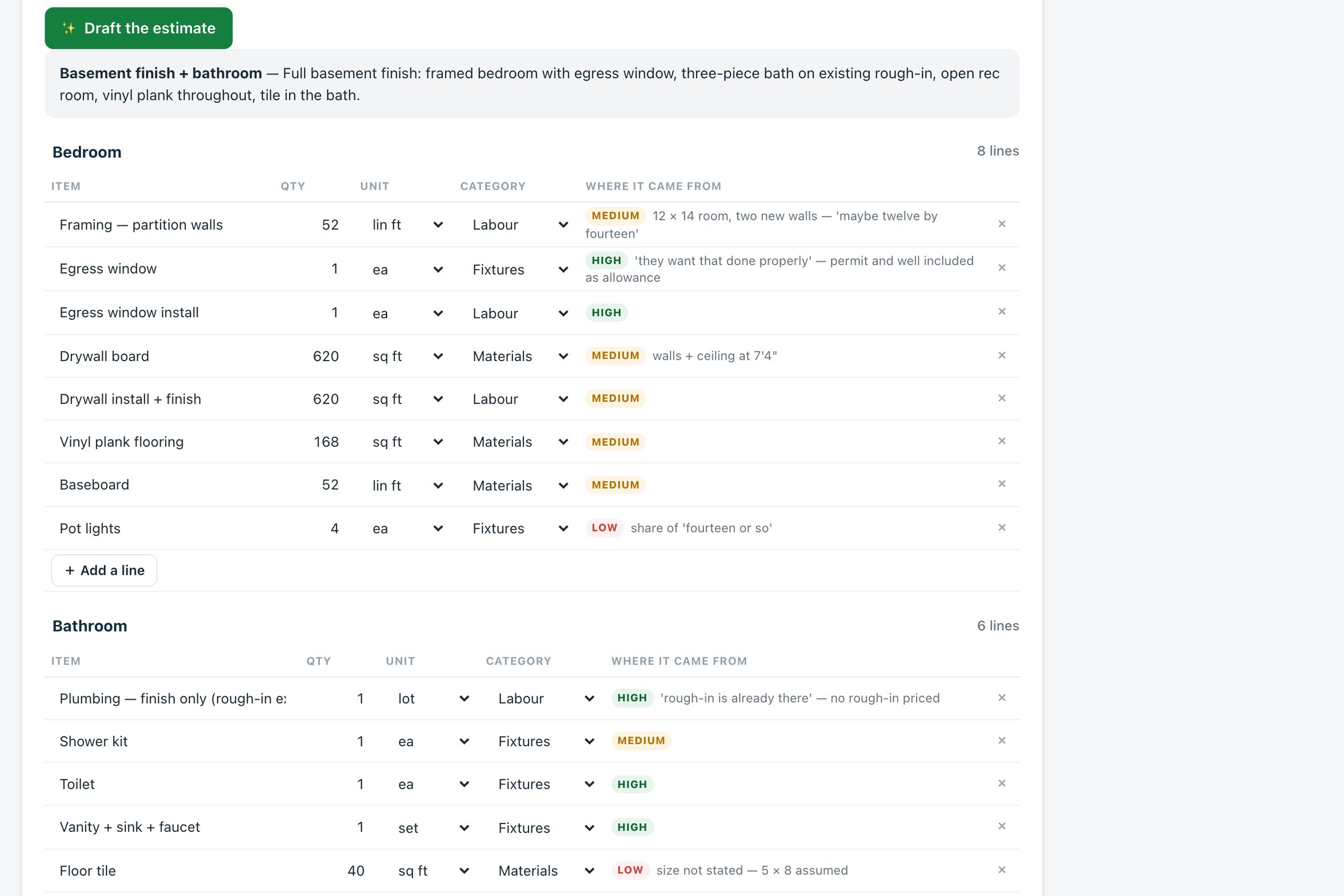
The Estiquik walkthrough page in the demo, with the transcript of a basement walkthrough and the drafted rooms and line items below it
A drafted basement, from the live demo's walkthrough
Recording to draft

What the AI estimator does

It listens to a walkthrough and writes the estimate's skeleton. It does not price it and it does not send it; those stay yours.

🎙️

Record, or upload a voice memo

Walk the job and talk. Eight minutes is plenty. Record in the browser on your phone, or upload a voice memo you made on site; the recording is transcribed in a few seconds and you can fix anything it misheard before drafting.

"Eighteen" for "eight" is the usual one
📷

Photos, notes, measurements, an old quote

Add photos of the rooms, the homeowner's wish list, your own measurements and the lines from an earlier estimate to revise. The more it sees, the fewer questions it leaves you.

Photos are downscaled before upload
🏠

Rooms, line items, quantities, units

The draft comes back as rooms with line items in the same categories and units as the templates — square feet, linear feet, each, lot, allowance — with a confidence mark on each quantity and a note quoting what was said.

"Probably eight feet" → 8 lin ft, medium

What it assumed, excluded and would ask

A draft also lists its assumptions, what it left out, and the questions to put to the homeowner — the ceiling height it took, the fixture it did not hear a size for.

The follow-up call, written for you

Marked until you look

Every drafted line is marked ✨ and the estimate cannot be emailed or sent for signature while any remain. Editing a line confirms it; Confirm all clears the rest.

See e-signature →
🏷️

Priced by you, in a click

Line names match the templates and your price list, so Fill prices puts your rates on the draft in one click — or type them. The AI never guesses a price.

See the price list on the pricing page →
Eight minutes to a skeleton

How a walkthrough becomes an estimate

Four steps, the first of which you were doing anyway.

STEP 1

Record

On the walkthrough page, press record and talk: rooms, what is coming out, what is going in, sizes, requests. Or upload the voice memo from your phone. Stop when you are done.

STEP 2

Check the transcript

It appears in a few seconds. Read it once and fix what was misheard — numbers mostly. Add photos, the homeowner's notes, your measurements, an old estimate if there is one.

STEP 3

Draft

Press Draft the estimate. The draft comes back as rooms and lines with quantities and units, each marked ✨, plus assumptions, exclusions and questions. Add rooms to an existing estimate or create a new one.

STEP 4

Price and confirm

Fill prices from your price list or type your rates. Edit each line to confirm it, or Confirm all. Only then can the estimate be emailed or signed — the same estimate flow as every other job.

The transcript is made by a speech-to-text model and the draft by Anthropic's Claude; the recording, photos and notes are sent to those services for that purpose and the draft is stored with your estimate. A draft costs a few cents to make, which is why Pro carries a monthly allowance rather than a meter.

The two rules

What the AI estimator will not do, on purpose

An estimator's assistant that priced jobs or sent documents would be a liability, not a tool. Two rules are built in and cannot be switched off.

It never pricesEvery drafted line lands with the price blank — literally $0 — for you or for Fill prices from your price list. The model does not see your rates and does not invent any. A quantity it is unsure of is marked low confidence, not guessed high.
It never sendsDrafted lines stay marked ✨ until you have looked at them, and an estimate with any ✨ line cannot be emailed or sent for signature. Confirming is editing the line or pressing Confirm all — a deliberate act, not a timeout.
It shows its workingEach quantity carries the phrase it was taken from and a confidence mark. Assumptions, exclusions and questions are listed under the draft, so what it did not hear is as visible as what it did.
It uses your vocabularyLine names follow the templates and your price list, so a draft prices with the same rates the rest of your estimates use, and the estimate that results is indistinguishable from one you typed.
AI estimator pricing

What it costs next to the AI features other tools sell

The AI estimator is included in Pro with a monthly allowance; nothing is metered. Vendor facts below were read from their own pricing pages on 3 September 2026 and 7 September 2026, in US dollars.

ProductMonthlyWhat that buys
Estiquik Pro$29.99CA$34.99 · 10 walkthrough drafts a month included (Crew: 30 across the team), with plan takeoff, change orders, contracts, job costing, QuickBooks. Annual $299.99 / CA$349.99.
BuildxactAI add-ons $99–$149Sold as add-ons on top of plans that start at $199; from buildxact.com/us/pricing, 7 September 2026.
JobberPlus, from $499Jobber's AI features are receptionist and marketing add-ons on the Plus tier — answering calls and writing posts, not drafting estimates.
JoistAn AI receptionist for missed calls; no walkthrough-to-estimate drafting.

The Buildxact, Jobber and Joist comparison pages carry the full tier tables and their dates.

Where it stops

What the AI estimator is

Pick Estiquik if you…

  • Quote from a site visit and hate the typing afterwardsThe walkthrough you already do becomes the draft; the evening at the laptop becomes twenty minutes of pricing.
  • Want the AI to stop at the quantitiesIt never sees your rates and never invents a price. You price; it removes the blank page.
  • Work in the templates' vocabularyKitchens, bathrooms, basements, additions, decks — the draft speaks the same line names as the nine templates and Fill prices.
  • Want a record of what was said on siteThe transcript, the assumptions and the questions stay with the estimate.

Pick a different tool if you need…

  • A priced estimate without your involvementEstiquik's draft has no prices by design. A tool that prices from a national database is a different product with different risks.
  • Quantities measured from the drawingThat is the plan takeoff, not the walkthrough: trace the rooms on the PDF and the quantities land on the same estimate.
  • Unlimited draftsPro includes ten a month and Crew thirty, because each draft costs real money to make. A trial includes three.
  • A chatbotThere is no chat window. You record a walkthrough; it returns an estimate skeleton. Questions it has for you are listed under the draft, not asked back and forth.

A transcription of your walkthrough turned into the rooms, lines, quantities and units of an estimate, with its assumptions and questions written down, and the prices left for you. It was built in September 2026 to remove the blank page from estimating, and the two rules above — never price, never send — are the reason it can be trusted with a real client's job.

Quantities are only as good as what was said: a draft made from 'the bedroom, maybe twelve by fourteen' carries a medium-confidence 168 square feet and says so. Measure before you price anything that matters, or take it off the plan.

Before you ask

Questions contractors ask

What does Record your walkthrough do?

You walk the house and talk — what is coming out, what is going in, rough sizes, what the homeowner asked for — and Estiquik turns the recording into a draft estimate: rooms, line items, quantities and units, plus what it assumed, what is excluded and what to ask the homeowner. Add photos, your own notes and measurements, or an old estimate to revise. Upload a voice memo from your phone if you would rather not record in the browser.

Does it price the job?

No. Every line lands with the price blank, for you or for Fill prices from your price list. The model never sees your rates and never invents a price; a quantity it is unsure of is marked low confidence rather than guessed.

Can it send the estimate to the client?

No. Drafted lines are marked ✨ until you have looked at them, and the estimate cannot be emailed or sent for signature while any remain. Editing a line confirms it; Confirm all clears the rest. Sending is always your action.

How long a recording does it take?

Eight minutes is plenty for most jobs. The transcript appears in a few seconds and you can fix anything it misheard before drafting. Long, rambling recordings mostly produce more questions, not more lines.

Where does the recording go?

To a speech-to-text service for the transcript, and the transcript, photos and notes to Anthropic's Claude for the draft, for that purpose only. The transcript and the draft are stored with your estimate in your account. Nothing is sent to the client.

Which plan is it on, and how many drafts do I get?

Pro and Crew. Pro includes ten drafts a calendar month and Crew thirty across the team; the 14-day trial includes three. Each draft costs Estiquik a few cents to make, which is why it is an allowance rather than a per-use charge.

Record the next walkthrough instead of typing it up

Fourteen days of Pro, no card, three drafts included. Talk through one real job and price what comes back.

Start free — no card required
14-day trial of Pro · Cancel anytime