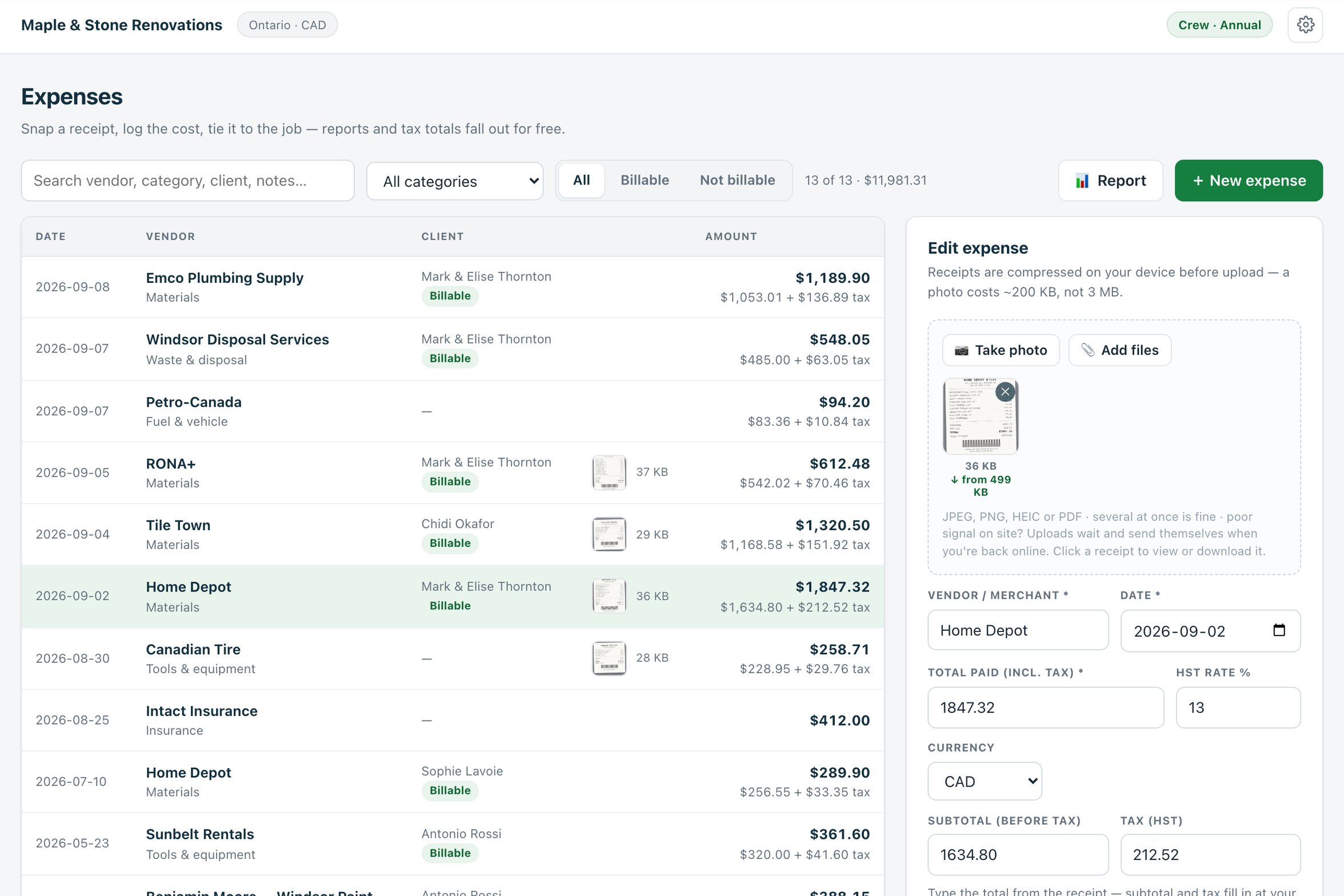
Every lost receipt is a cost you paid twice: once at the counter and again when you could not reclaim the tax or bill it to the client. Estiquik's receipt capture is built for the truck, not the office. Photograph the receipt on your phone the moment it is in your hand, type the total, pick the job, and it is filed — compressed to a fraction of a photo, uploaded when you have signal, with the tax split out and the expense already counted against the job's margin.
A receipt is a photo, an amount and a job. Everything else — the tax, the category, the report — falls out of those three.
Press Take photo and the phone camera opens; or Add files for JPEG, PNG, HEIC or PDF, several at once. The receipt is attached to the expense the moment you save.
A 3 MB phone photo lands at about 200 KB: receipts are high-contrast paper, and past 1,200 pixels wide you are only storing texture. The original never leaves the device.
No coverage in the basement or the lumber yard. Uploads queue on the device and send themselves when you are back online — including after the page is closed and reopened.
Type what you paid and the subtotal and tax fill in at your province's or state's rate. Tax-exempt items, tips, a different rate — edit the subtotal or tax and the total stays as entered.
Link the estimate or the client so the expense counts against that job. Pick a category — materials, tools and equipment, subcontractors, fuel, permits, disposal, meals, insurance, your own — and how it was paid, and tick Billable if it passes through to the client.
See job costing →By category, client, month or payment method: before tax, tax and total, with the tax paid shown as potentially reclaimable, the billable total, and how many expenses carry a receipt. Export CSV or print.
Under a minute at the counter. The rest happens on its own.
On the Expenses page, New expense, Take photo. Or add the PDF the supplier emailed. The photo compresses on the phone; if there is no signal it waits.
Vendor, date, the total from the receipt. Subtotal and tax fill in at your region's rate; correct them if the receipt differs. Pick the currency if you buy across the border.
Category, payment method, the client and the estimate it belongs to, Billable if the client pays for it, a note if the receipt will not explain itself in April. Save.
The expense appears in the job's spent total on job costing the same minute, in the report under its category and month, and in the tax paid figure your accountant reclaims.
Receipts are stored privately with your account — nothing in the receipt store is world-readable — under a 1 MB cap per file that the compression keeps you well inside. Expenses stay in Estiquik: the QuickBooks sync moves clients, invoices and payments, not expenses.
One page, filtered by period, client, category and billable, with the five numbers a small contractor's bookkeeper wants first.
Receipt capture, expenses and the report are on Pro, with job costing. Vendor facts below were read from their own pricing pages on 3 September 2026, in US dollars.
| Product | Monthly | What that buys |
|---|---|---|
| Estiquik Pro | $29.99 | CA$34.99 · receipt capture, expenses and reports, job costing, plan takeoff, change orders, contracts, QuickBooks. Annual $299.99 / CA$349.99. |
| Jobber | Connect, $139 | Expenses and receipts start on Connect at $139 for one user; Core at $49 does not include them. |
| Joist | Pro, $17 | Expenses on Pro and up; no estimate-vs-actual job costing page to land them on. |
| A standalone receipt app | Separate subscription | Expensify, Dext and similar file the receipt for the books but not against the job — the margin per job stays in a spreadsheet. |
The Jobber and Joist comparison pages carry the full tier tables and their dates.
A phone camera, a compressed upload that survives bad signal, and an expense record that knows which job it belongs to and how much of it was tax. It exists so the receipt is captured the day you spent the money and so job costing and the tax figure are right without a Sunday of data entry. It is deliberately not an accounting system: the report and the CSV are what you hand to one.
Receipt capture, expenses and the report need Pro, with job costing on the same plan.
Yes, on Pro. Photograph receipts on site — they compress on your phone before upload — and attach them to expense records tied to a client, estimate or invoice, with the tax carried as its own figure and a billable flag for pass-through costs. Reports group them by category, client, month or payment method.
No. You type the total from the receipt and the subtotal and tax fill in at your region's rate; you can correct either. Estiquik files and splits the receipt, it does not OCR it — that keeps it accurate on the crumpled, faded receipts real jobs produce.
The photo is compressed on the device and queued. It uploads on its own when the connection returns, even if you closed the page in between, and the expense record you saved already points at it.
A typical phone photo lands around 200 KB after compression — 1,200 pixels wide is plenty for a receipt. There is a 1 MB cap per file that you will not normally reach. PDFs are stored as sent.
Whatever your region's is: HST, GST plus PST or QST in Canada, state sales tax in the US, with the rate pre-filled from your account and editable per expense. The report totals the tax paid in the period as potentially reclaimable — confirm the treatment with your accountant; this is not tax advice.
Not the expenses. The QuickBooks Online sync moves clients, invoices and payments. Export the expense report to CSV for the books.
Pro, at $29.99 a month or $299.99 a year (CA$34.99 / CA$349.99), with job costing, the expense report, plan takeoff, change orders, contracts and QuickBooks. The 14-day trial is Pro and needs no card.
Fourteen days of Pro, no card. Snap one receipt at the counter tomorrow and watch it land on the job.