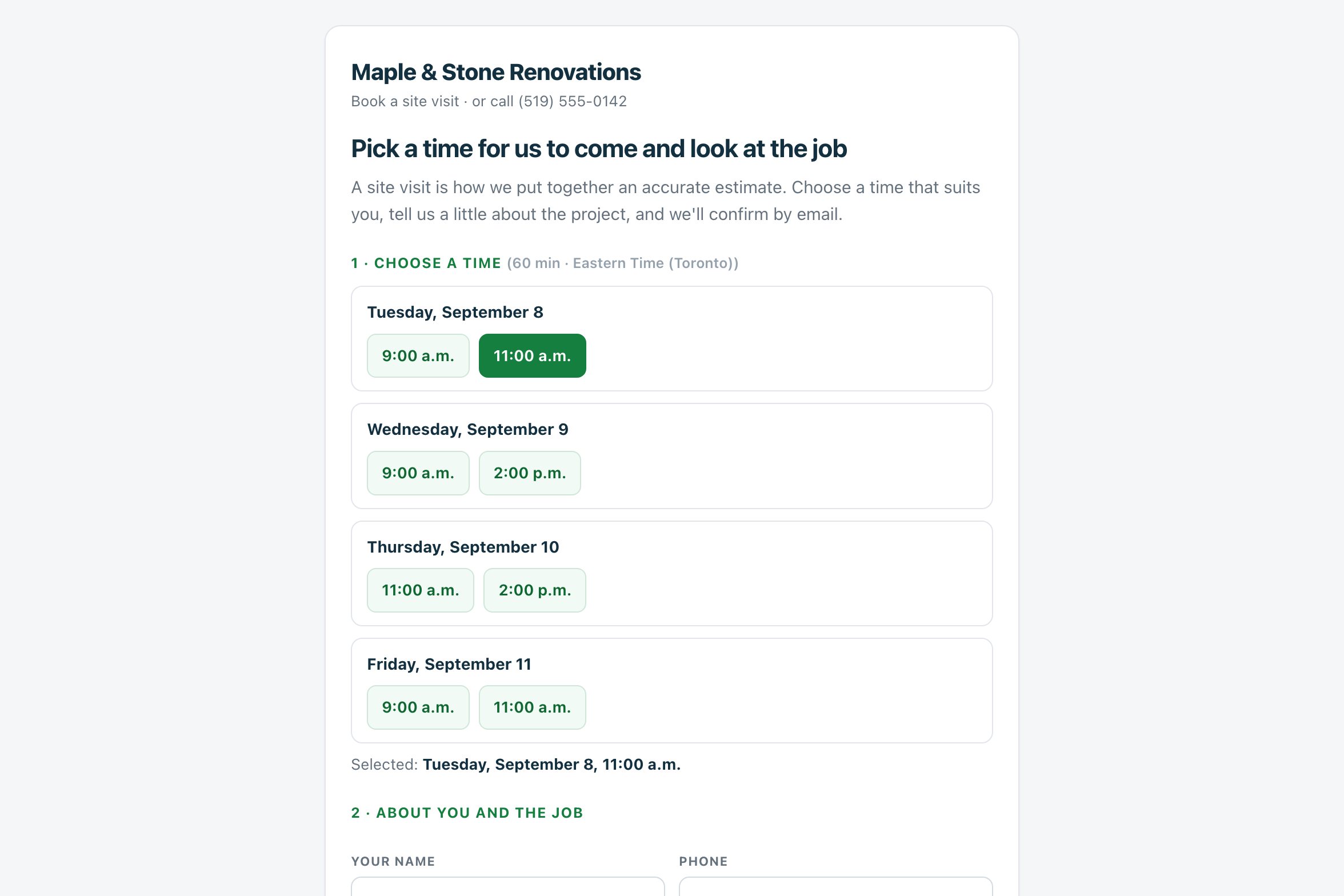
The visit that produces the estimate is the appointment a renovation contractor actually needs booked. Estiquik gives you a public link — estiquik.com/book/your-name — for your website, your Instagram bio and the appointment link on your Google Business Profile. The homeowner picks a time you have open, gives the address and says what they want done; the visit lands on your schedule, they land in Clients and Leads, and both of you get the email.
One public link, your rules for when visits happen, and everything the homeowner types arriving where you already work.
Claim estiquik.com/book/your-name from the Booking page in the sidebar. Copy it, or paste the ready-made Book a site visit button into any website.
Which days, earliest start and latest finish, visit length, visits per day at most, the notice you need and how far ahead the page offers times. The defaults are weekdays, 9 to 5, one hour, two a day, one day's notice, three weeks out.
Times you already have a job on the schedule are blocked. Paste the private iCal link from Google or Apple Calendar and your own calendar's busy times are blocked too, read-only.
They tap a time, give a name, phone, email and the property address, and describe the job. No account, no app, and a confirmation by email.
The visit goes on your schedule, the homeowner is added to Clients with the source Online booking, a lead is created at Site visit booked with their note as the first entry, and you get an email with everything they wrote.
Paste the link into your Google Business Profile under Booking or Appointment links and a Book button shows on your Maps listing. No partner programme, no approval wait.
You set it up once. After that the page runs itself and tells you when someone books.
Booking page in the sidebar. Pick the part after estiquik.com/book/, set your days, hours, visit length, notice and horizon, and switch Take bookings on.
Website button, Instagram bio, the Google Business Profile appointment link, the signature on estimates you email. The page shows your name and logo.
They pick a time the page offers — never one you are busy — and tell you the address and the job. They get a confirmation email and a reminder the evening before.
A job on your schedule, a client record, a lead at Site visit booked, and an email to you with what they wrote. Cancel or move it from the schedule like any job.
Bookings are rate-limited and spam-checked — a hidden field, a minimum time on the page, a cap per hour and per day — so the link can sit on a public website without filling your calendar with junk.
A booking page is only useful if it never books over something else. Three things keep it honest.
The booking page is on Pro with the schedule. Vendor facts below were read from their own sites on 3 September 2026, in US dollars.
| Product | Monthly | What that buys |
|---|---|---|
| Estiquik Pro | $29.99 | CA$34.99 · booking page, schedule with calendar feed, plan takeoff, change orders, contracts, job costing, QuickBooks. Annual $299.99 / CA$349.99. |
| Jobber | Core $49 | Online booking with time slots from your website or Google listing on every plan; one user, $29 per extra user. |
| Joist | — | No online booking. |
| A standalone scheduler (Setmore, Calendly and similar) | Free to paid tiers | A booking link that lives outside your estimating app: the appointment does not become a client, a lead or a job, and the estimate starts from scratch. |
The Jobber and Joist comparison pages carry the full tier tables and their dates.
A public page that books the site visit and files it where you already work. It is built for the renovation contractor who quotes from a visit, not for a service fleet selling time slots, and it deliberately skips the pieces that need write access to your calendar or a partner programme with Google.
The booking page needs Pro, together with the schedule it books into. The page is deliberately kept out of search engines; it is for your links, not for ranking.
Yes, on Pro and Crew. Booking page in the sidebar gives you a public link — estiquik.com/book/your-name — where a homeowner picks a time, gives their address and describes the job. The visit lands on your schedule, they are added to Clients with the source Online booking, they get a confirmation and the evening-before reminder, and you get an email with everything they wrote.
Yes. When a homeowner books, a lead is created at Site visit booked with the visit date as its follow-up date and whatever they wrote about the job as the first note. If you already had an open lead with that email, that lead moves to Site visit booked instead of a second one appearing.
In your Google Business Profile choose Edit profile, then Booking or Appointment links, and paste your link. A Book button then shows on your Maps listing. This is the ordinary appointment link, not Reserve with Google, so there is no partner approval to wait for.
No. Jobs on your Estiquik schedule block their time, and if you paste the private iCal link from Google or Apple Calendar on the Booking page, your own calendar's busy times are blocked too. Estiquik only reads that feed; it never writes to your calendar.
Yes. Set visits per day at most, the notice you need — a day by default — and how far ahead the page offers times, plus the days and hours you take visits and the length of a visit.
Pro, at $29.99 a month or $299.99 a year (CA$34.99 / CA$349.99), with the schedule, plan takeoff, change orders, contracts, job costing and QuickBooks. The 14-day trial is Pro and needs no card.
Fourteen days of Pro, no card. Claim your link, paste it into your Business Profile, and the next site visit books itself.