◆ On Pro · $29.99 a month (CA$34.99) · 14-day trial

A job calendar that ends in an invoice.

Most contractor scheduling apps are dispatch boards for fleets. Estiquik's schedule is the other thing: a month calendar of your jobs, each one linked to its estimate and its client, a Today view with the address and the phone number one tap away, and a Done button that hands the job to the invoice. The evening before, the client gets a reminder from your business name.

No card to start Subscribe from Google or Apple Calendar Day-before client reminders
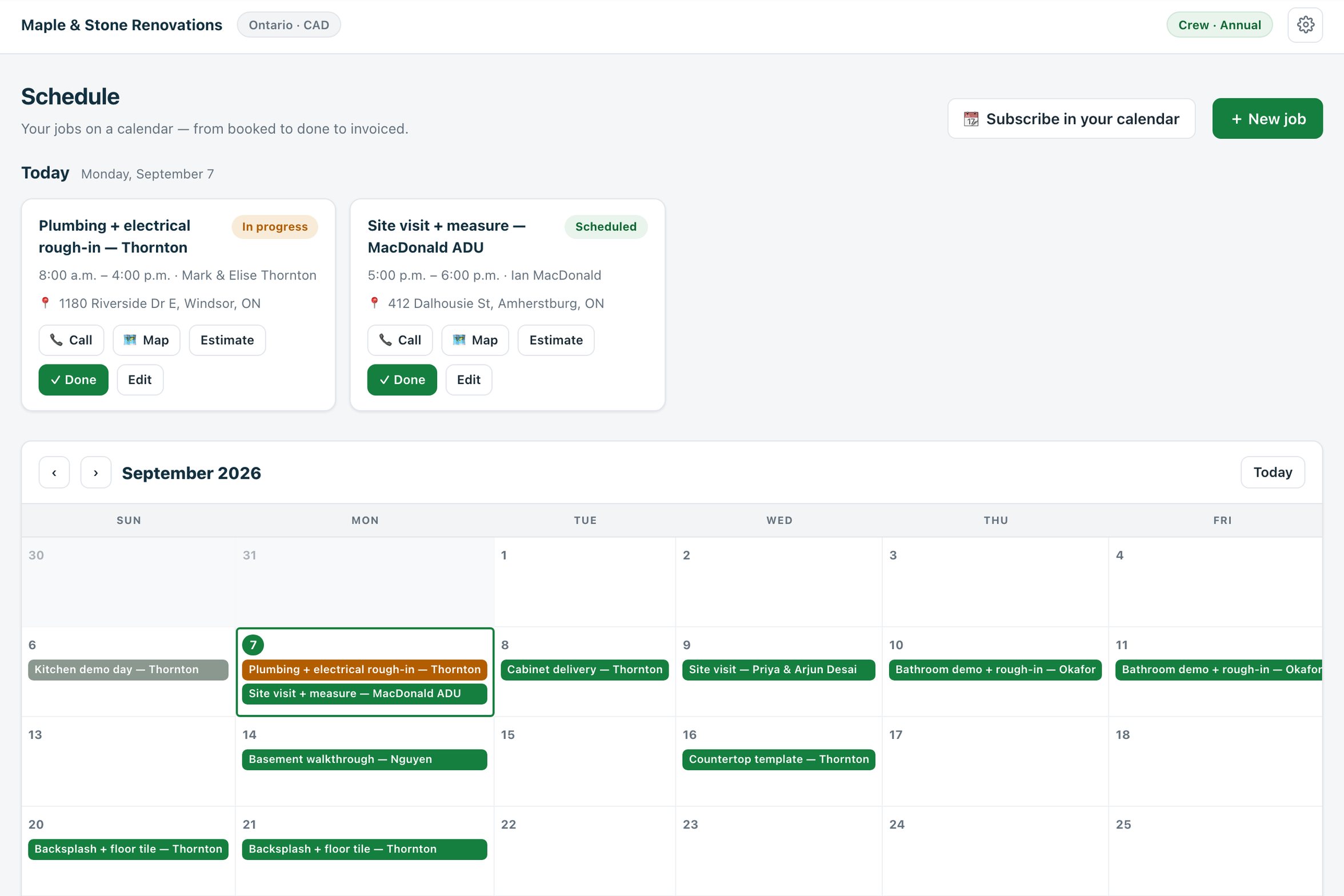
The Estiquik schedule: a Today panel with two jobs showing status, time, client, address and Call, Map, Estimate and Done buttons, above a September month calendar with jobs on their days
The schedule in the live demo
Booked, in progress, done, invoiced

What the schedule does

A job is a date or a span of days, a time, a client, an address, a linked estimate and a status. That is the whole model, on purpose.

📆

A month calendar of jobs

Every job on its day, multi-day jobs across their days, colour by status. Tap a day to add a job to it. Go from the estimate with Schedule job and the client and address are already filled.

Scheduled · In progress · Done · Invoiced
📍

Today, with the address one tap away

The Today view lists what is on: time, client, address with Call and Map buttons, the linked estimate, and Done. Built for the phone in the truck.

Call · Map · Estimate · Done
🧾

Done becomes invoiced

Mark a job done and invoice its estimate from there. A done job whose estimate has since been billed reads as invoiced on its own — the calendar tells you what is still owed.

See invoicing →
🔔

The client is reminded the evening before

At 5 p.m. the day before, every client with a job tomorrow gets an email from your business name with the time and what the job is. Turn it off per client if they would rather not.

Pro and Crew
📲

In the calendar you already use

Subscribe once and every job shows in Google or Apple Calendar, read-only and updated automatically. Google: Other calendars, From URL. iPhone: Add Subscribed Calendar.

Your phone's calendar, your jobs
🏠

Site visits book themselves onto it

Turn on the booking page and homeowners book site visits straight onto the schedule, blocked around the jobs already there.

See online booking →
Estimate to calendar to invoice

How a job moves through the week

The schedule is the middle of the loop, not a separate app.

STEP 1

Schedule from the estimate

Press Schedule job on an approved estimate. Title, client, address and the estimate link are filled; pick the day or the span of days and the hours.

STEP 2

Work from Today

Open the schedule on the phone. Today's jobs show the time, the address with a Map button, the client with a Call button and any crew notes — gate code, materials to bring.

STEP 3

Mark it done

Done flips the status. Multi-day jobs stay In progress until the last day. Notes stay on the job for the next time you work for that client.

STEP 4

Invoice it

From the done job, open the estimate and create its invoice — or the progress stage that is due. Once billed, the job reads as invoiced on the calendar.

Jobs, estimates, invoices and clients are the same records everywhere in Estiquik. There is nothing to sync between a scheduling app and an invoicing app because they are one app.

Reminders and the feed

The two things that leave the app

The schedule stays useful outside Estiquik in two ways, both one-directional and both switchable.

The day-before reminderSent at 5 p.m. Eastern the evening before to every client with a job the next day, from your business name, with the time window and the job title. It counts against your account's 50-emails-a-day allowance, and any client can be excluded from automated emails.
The calendar feedA private link you subscribe to from Google Calendar, Apple Calendar or Outlook. Every job appears with its time, client and address; it updates as you change the schedule. Read-only: nothing you do in Google Calendar comes back.
Your own calendar's busy timesIn the other direction, the booking page can read your Google or Apple Calendar's busy times so site visits are never booked over them.
Nothing elseNo GPS, no location tracking, no timesheets. The schedule knows where the job is, not where you are.
Contractor scheduling app pricing

What it costs next to the apps built around the calendar

The schedule, calendar feed and booking page are on Pro. Vendor facts below were read from their own pricing pages on 3 September 2026, in US dollars.

ProductMonthlyWhat that buys
Estiquik Pro$29.99CA$34.99 · schedule with feed and reminders, booking page, plan takeoff, change orders, contracts, job costing, QuickBooks. Annual $299.99 / CA$349.99.
JobberCore $49Drag-and-drop scheduling on every plan; routing and GPS on Connect at $139, Find a Time on Grow at $199. One user; $29 per extra user.
JoistRun $70Jobs and visit scheduling with a calendar, launched August 2026, introductory price with a $100 list.
BuildxactFoundation $199Scheduling within its project management for builders; from buildxact.com/us/pricing, 7 September 2026.

The Jobber, Joist and Buildxact comparison pages carry the full tier tables and their dates.

Where it stops

What the schedule is

Pick Estiquik if you…

  • Run a handful of jobs a week, not a fleetA calendar of jobs linked to estimates, not a dispatch board.
  • Want the schedule on the phone you already carrySubscribe once and the jobs are in your phone's calendar, alerts included.
  • Want the client reminded without doing itEvening-before email from your business name, automatically.
  • Want Done to mean InvoiceThe job, the estimate and the invoice are one chain.

Pick Jobber or a dispatch tool if you need…

  • Dispatch, routing and GPSAssigning visits to crews on a map, optimising routes, tracking trucks. Estiquik has a calendar, not a dispatch board.
  • Timesheets and clock-inNo time tracking. Labour is a cost only if you enter it as an expense.
  • Drag-and-drop rescheduling across crew columnsEdit the job's date and time; there are no per-person lanes.
  • SMS remindersThe day-before reminder is an email. Text-message reminders are not offered today.
  • Two-way calendar syncThe feed is read-only into your calendar; the booking page reads busy times read-only out of it. Nothing writes both ways.

A month calendar and a Today view for the jobs an estimate produces, with a client reminder the evening before and a feed into the calendar on your phone. It was built in September 2026 as the lightweight thing between a signed estimate and a sent invoice, and it stops where dispatch software starts.

The schedule needs Pro, together with the calendar feed, the day-before reminders and the booking page that books onto it.

Before you ask

Questions contractors ask

Is this a dispatch or crew-scheduling tool?

No. It is a job calendar for the contractor who quotes and runs the work: jobs linked to estimates, a Today view with call and map buttons, done-to-invoice, a calendar feed and client reminders. There is no routing, GPS, timesheet or per-crew lane. Crew shares the same schedule across up to ten logins.

Can I see my jobs in Google or Apple Calendar?

Yes. Press Subscribe in your calendar on the schedule, copy the private link, and add it in Google Calendar under Other calendars, From URL, or on iPhone under Settings, Calendar, Accounts, Add Subscribed Calendar. It is read-only and updates automatically.

Does the client get a reminder?

On Pro and Crew, yes. At 5 p.m. Eastern the day before, a client with a job tomorrow gets an email from your business name with the time window and the job. Any client can be excluded, and every automated email carries a stop link.

How does a job become an invoice?

Mark it Done in the Today view or on the job, then open its estimate and create the invoice — or the next progress stage. A done job whose estimate has been billed shows as Invoiced on the calendar without you touching it.

Can homeowners book onto the schedule themselves?

Yes, with the booking page on Pro. They pick a time the page offers — never over an existing job or a busy time from your own calendar — and the visit appears on the schedule, in Clients and in Leads.

Which plan is the schedule on?

Pro, at $29.99 a month or $299.99 a year (CA$34.99 / CA$349.99), with the calendar feed, the day-before reminders, the booking page, plan takeoff, change orders, contracts, job costing and QuickBooks. The 14-day trial is Pro and needs no card.

Put this week's jobs on the calendar

Fourteen days of Pro, no card. Schedule from the estimate, subscribe from your phone, and let the reminders go out on their own.

Start free — no card required
14-day trial of Pro · Cancel anytime