◆ Estimates on Starter · contracts and change orders on Pro

Signed from a phone, with the audit record on your copy.

An approved estimate is a promise; a signed one is a record. Estiquik puts a Review and sign button on the estimate email, or a link you can text, and the client signs on their phone with no account and no app. What they saw, when they signed and where from are stamped on your copy — and the same flow signs contracts and change orders.

No card to start No account for the client Name, time, IP, document fingerprint
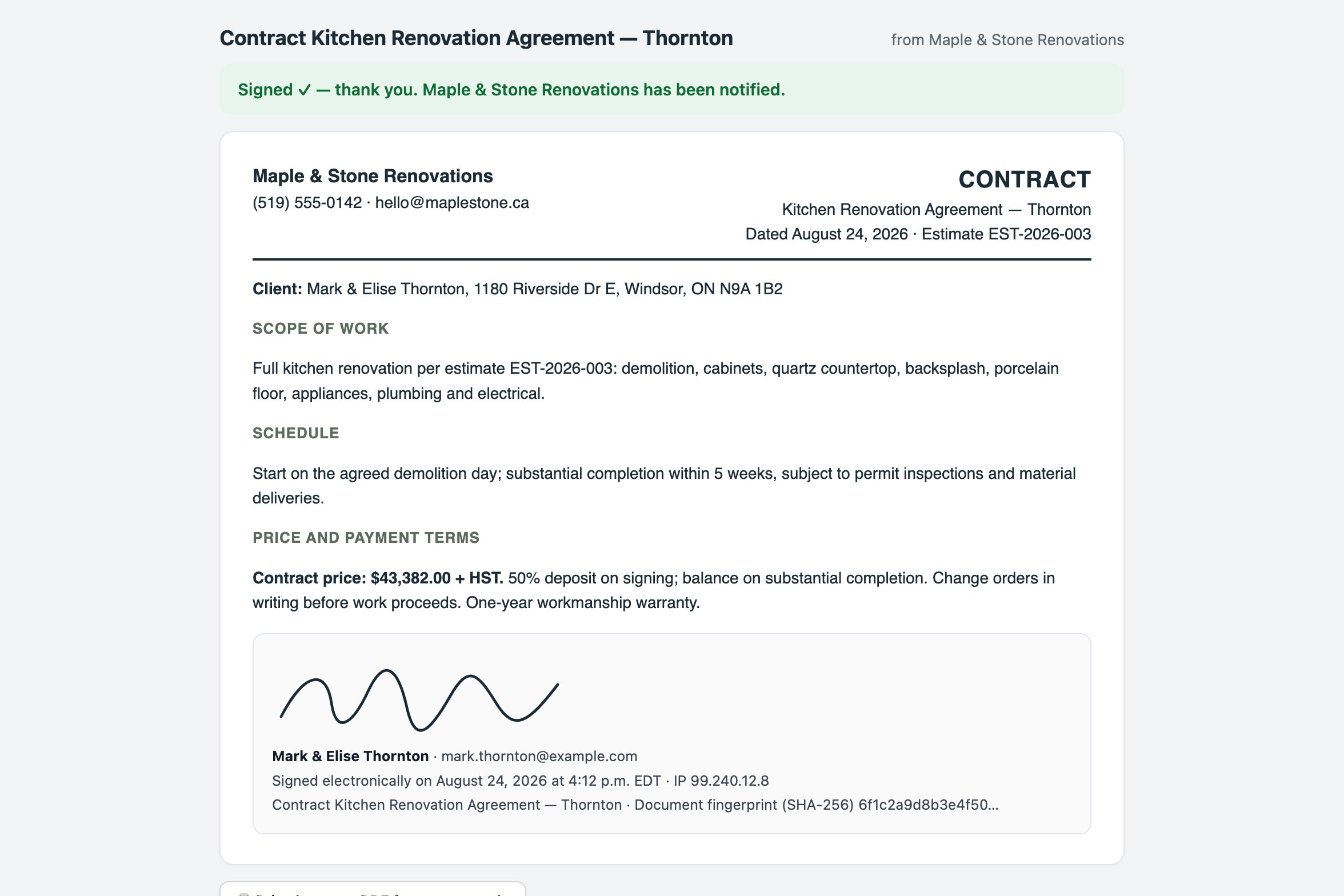
A signed contract as the client sees it after signing: the agreement text, a drawn signature, and the certificate line with the signer's name, time, IP address and document fingerprint
Signed contract, rendered by the signing page
One flow, three documents

What the e-signature does

The same signing page handles the estimate, the contract and every change order, so the client learns it once.

✉️

A Review and sign button in the email

Tick Include a Review and sign button when you email the estimate. The client opens it, reads the estimate exactly as sent, draws or types a signature, and you get an email the moment they sign.

Estimate marked approved on its own
🔗

Or a signing link

Press Signing link on the document to copy a link you can text or paste anywhere. It opens the same page, on any phone, with nothing to install.

Text it from the driveway
📸

A snapshot of what they signed

Estiquik keeps the document as it was sent and the link opens that snapshot. Change the document and re-send, and a fresh link is issued while the old one is retired — nobody signs a stale version.

No signing a version you changed
🧾

Estimates, contracts, change orders

Estimates sign on Starter and up. Contracts drafted from the estimate and change orders priced mid-job sign the same way on Pro, and a signed change order approves itself.

See change orders →
🖨️

Paper still works

Print the document, get a wet signature on site, and attach the signed copy to the job. Some clients prefer it, and the record is filed the same place.

Attach the scan
📁

Filed with the job

The signed copy and its certificate sit on the client's record with the estimate, the invoices and the change orders, and the client gets their copy by email.

One place, not a PDF folder
Send to signed

How a client signs an estimate

Two taps for the client, no login, no app.

STEP 1

Send

Email the estimate with the Review and sign button, or copy the signing link and text it. The document snapshot and its fingerprint are stored at that moment.

STEP 2

Open

The client opens it on their phone and sees the estimate exactly as you sent it, with the total, above a signature pad.

STEP 3

Sign

They type their name and email, draw or type a signature, tick that they agree to sign electronically, and press Sign. The link is good for 90 days.

STEP 4

Recorded

You get an email; the estimate is marked approved; the signature block — name, email, date, time, IP address, browser and the document fingerprint — prints on your copy from then on.

Estimates that were emailed with the plain Approve button still work: an approval by button records the name, time and document fingerprint; a signature adds the drawn or typed signature, the email and the IP address on top.

The record

What is kept when someone signs

A signature is worth what you can show about it later. Every signed document carries the same certificate.

WhoThe signer's typed name and email address, and the signature image they drew or the typed signature they chose.
When and from whereThe date and time of signing, the IP address the signature came from, and the browser it was signed in.
What, exactlyA SHA-256 fingerprint of the exact document the client saw. Edit the document afterwards and the fingerprint no longer matches, so the signed version is provably the signed version.
Where it livesThe signature image is stored with your account, the certificate prints on the document, and firestore rules stop anything on the client side from writing to the signature record.
E-signature pricing

What it costs next to the apps small contractors already use

There is no per-envelope fee and no separate e-signature subscription. Vendor facts below were read from their own pricing and help pages on 3 September 2026, in US dollars.

ProductMonthlyWhat that buys
Estiquik Starter$19.99CA$24.99 · e-signature on estimates, unlimited estimates and invoices, card payments via your Stripe. Contracts and change orders sign on Pro at $29.99.
JoistBasics $10 and upE-signatures on estimates and invoices on every paid tier.
JobberCore $49Quote approval with a signature on every plan; DocuSign through an integration.
DocuSign or a standalone toolSeparate subscriptionA second app and a second place the signed copy lives. Estiquik files it with the job.

The Joist and Jobber comparison pages carry the full tier tables and their dates.

Where it stops

What an Estiquik e-signature is

Pick Estiquik if you…

  • Want the estimate signed before the depositThe Review and sign button is on the same email as the estimate; nothing extra to send.
  • Sign contracts and change orders tooOne flow, three documents, and a signed change order approves itself.
  • Need to prove what was signed laterThe fingerprint, time and IP are on your copy, not in a third-party vault you have to log into.
  • Work with clients who will not install anythingNo account, no app, any phone.

Pick DocuSign or a legal-grade tool if you need…

  • Multiple signers in sequenceOwner, spouse, architect and lender each signing in turn. Estiquik has one signer per document.
  • Identity verificationGovernment ID checks, knowledge-based authentication or witnessed signing. Estiquik records name, email, IP and browser — not identity.
  • Documents excluded from electronic signature by lawWills, some real-estate transfers and certain family-law documents. Ordinary commercial agreements are what this is for.
  • Templates with fillable fields for any documentEstiquik signs the documents it produces — estimates, contracts, change orders — not an arbitrary PDF you upload.

A signature on a document Estiquik produced, with a snapshot of that document and a record of who signed it, when and from where. Electronic signatures of this kind are recognised for ordinary commercial agreements in Canada and the United States — for example under Ontario's Electronic Commerce Act and the U.S. ESIGN Act — and a few document types are excluded by law. Whether a given signature holds in a given dispute depends on the facts. This is not legal advice.

Estimates sign on Starter and up. Contracts and change orders are Pro documents and sign on Pro.

Before you ask

Questions contractors ask

Can my client sign the estimate electronically?

Yes, on Starter and up. Email to client includes a Review and sign button, or press Signing link on the estimate to copy a link you can text. The client opens it on their phone, reads the estimate exactly as you sent it, draws or types a signature, and that is it — you get an email the moment they sign, the estimate is marked approved, and the signature block prints on your copy from then on.

How does e-signing work, and is it binding?

Estiquik keeps a snapshot of the document as sent and the link opens that snapshot with a signature pad. The client types their name and email, draws or types a signature, and ticks that they agree to sign electronically. The signature image, the date and time, their IP address and browser, and a SHA-256 fingerprint of the exact document are recorded and printed in the signature block. Electronic signatures of this kind are recognised for ordinary commercial agreements in Canada and the United States; a few document types are excluded by law, and this is not legal advice.

What if I change the estimate after sending the link?

Re-sending a document after you change it issues a fresh link and retires the old one, so nobody can sign a stale version. The fingerprint on the certificate always matches the version that was actually signed.

Does the client need an account or an app?

No. The signing page opens in any phone or desktop browser. They type a name and email, sign, and can print or save the signed page for their records.

Do contracts and change orders sign the same way?

Yes. Contracts drafted from the estimate and change orders priced mid-job use the same Review and sign button and signing link. Both are Pro documents; a signed change order flips to Approved on its own and counts toward the revised contract value.

Which plan is e-signature on?

Estimates sign on Starter at $19.99 a month (CA$24.99). Contracts and change orders, which are Pro documents, sign on Pro at $29.99 (CA$34.99). The 14-day trial is Pro and needs no card.

Get the next estimate signed, not just approved

Fourteen days of every feature, no card. Tick the Review and sign box on the next estimate you email.

Start free — no card required
14-day trial of Pro · Cancel anytime