A four-month job cannot be one invoice at the end. Estiquik puts the payment schedule on the estimate — 50 / 50, 30 / 40 / 30, or your own stages — so the client agrees to it before the deposit, and then turns each stage into its own invoice when you reach it. Holdback, where your province requires it, is kept back from every draw and released at the end.
Everything hangs off the schedule on the estimate. Change the stages there and every invoice that follows uses the new split.
Under Payment schedule, add the stages and their share of the price, or pick a preset — 50 / 50 or 30 / 40 / 30. The schedule prints on the estimate, so the client agrees to the terms with the price.
Press Invoice this stage on the estimate, or Create invoice and Estiquik picks the next unbilled stage. Each progress invoice gets its own number, due date and pay link.
A progress invoice shows the contract value, what was invoiced before, this stage's share and what is left — on the document the client sees, not just on your screen.
Set a holdback percentage on the estimate and that share is retained from every stage, then billed as a final holdback release invoice when the job is done.
A progress invoice carries the Pay by card button through your own Stripe account, records e-Transfers and cheques, and gets the same overdue reminders on Pro.
See invoicing →Job costing and the QuickBooks sync treat each stage as its own invoice, so the job's invoiced total and margin are right mid-project, not only at the end.
See job costing →Four steps, and the client has seen the schedule before any of them.
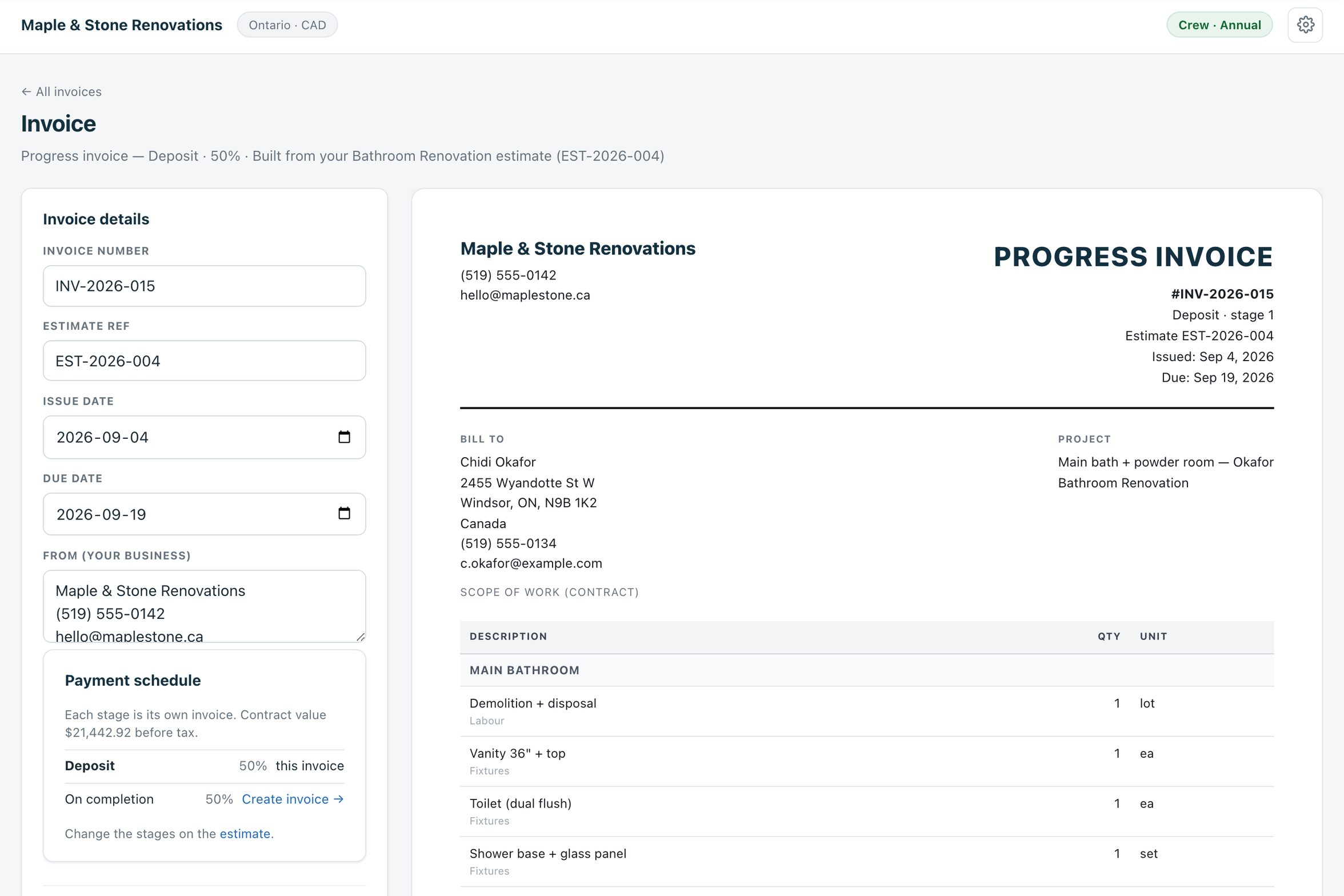
On the estimate, add Deposit, the draws and On completion with their percentages, and a holdback percentage if the contract or your province calls for one. The estimate shows the schedule.
The client approves the estimate; Invoice this stage creates the deposit invoice with its share of the contract value. Email it with the Pay button.
At each milestone — foundation, framing, rough-in, drywall — create the next invoice. Estiquik picks the next unbilled stage; the invoice states what was billed before and what remains.
When the job is done and the holdback period has run, the final invoice bills the retained amount. The client sees the whole sequence add up to the contract value.
Deductive or additive change orders are their own signed documents on Pro; see change orders for how they roll into the revised contract value.
Estiquik does not decide your deposit or your holdback — you do, and the estimate states it. What it does is make the arithmetic and the paperwork automatic.
Progress billing is on Starter. Vendor facts below were read from their own sites on 3 September 2026, in US dollars.
| Product | Monthly | What that buys |
|---|---|---|
| Estiquik Starter | $19.99 | CA$24.99 · payment schedule on the estimate, one invoice per stage, holdback release, card payments via your Stripe. |
| Joist | Free / $17 / $32 | Deposits and milestone payment requests on invoices; change orders on the $32 Elite tier, on invoices only. |
| Jobber | Core $49 | Deposits and progress invoicing on jobs; one user, $29 per extra user. |
| Buildxact | Foundation $199 | Progress claims for builders; from buildxact.com/us/pricing, 7 September 2026. |
Most estimating apps bill progress from the job, not from a schedule the client signed with the estimate. That difference is the whole feature.
It is a share of the estimate's contract value, invoiced against a stage the client saw when they approved the estimate. Change the schedule on the estimate and the stages that are not yet billed follow the new split; stages already invoiced are not rewritten.
Progress invoices are ordinary invoices otherwise: they print, email with a sent copy, carry the Pay button, record payments, feed job costing and sync to QuickBooks on Pro.
Yes. On the estimate, under Payment schedule, add the stages and their share of the price, or pick 50 / 50 or 30 / 40 / 30. Each stage then becomes its own progress invoice — Invoice this stage on the estimate, or Create invoice and Estiquik picks the next unbilled stage.
The contract value, what was invoiced before, this stage's share and what is left, with the stage name and number — plus the same line items, tax, due date and Pay button as any invoice.
Set a holdback percentage on the estimate. Every draw bills its share less the holdback; the retained amount is billed once at the end as a holdback release invoice. Ontario's Construction Act sets 10% for the lien period; other provinces and states differ, and the percentage is yours to set.
Yes. Stages that have not been invoiced yet follow the new split. Invoices already issued are not rewritten.
Change orders, on Pro, are separate signed documents that adjust the revised contract value — an extra adds, a credit subtracts. See the change orders page for how they are priced and signed.
Starter, at $19.99 a month (CA$24.99), alongside invoicing, e-signature and card payments. Automatic overdue reminders and the QuickBooks sync are on Pro at $29.99.
Fourteen days of every feature, no card. Set the stages once and every invoice on the job follows them.