◆ On Pro · $29.99 a month (CA$34.99) · 14-day trial

A client portal that is one private page for the homeowner.

One link, no password. The homeowner sees what they are getting, approves their selections, signs change orders, pays invoices, looks at the photos you share from site, checks the schedule and messages you, all on one page, instead of forty texts and a lost email.

✓ No card to start✓ No login for the homeowner✓ Never shows your costs
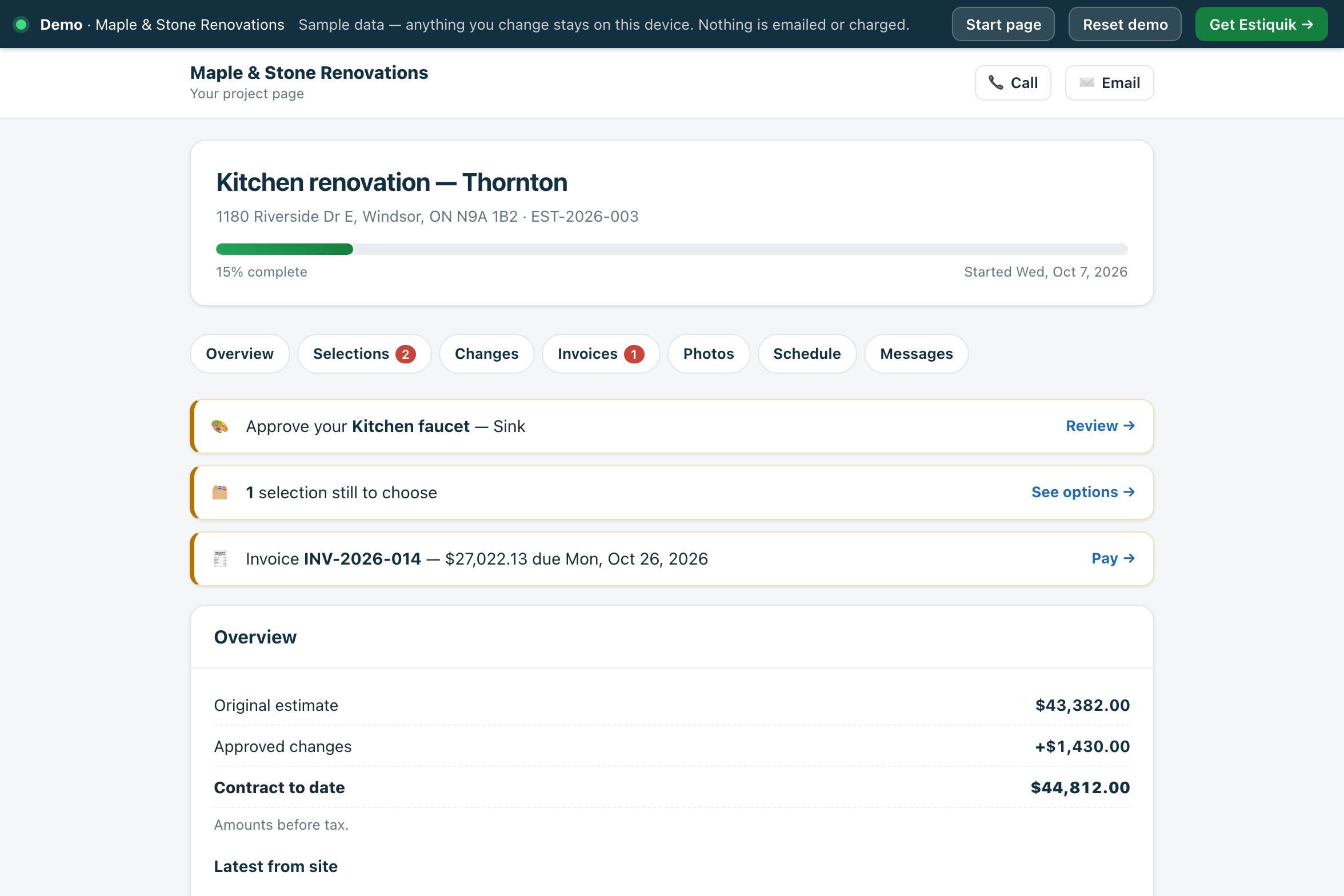
The homeowner's project page for the Thornton kitchen in Estiquik: 15% complete, to-dos to approve the kitchen faucet, choose one more selection and pay invoice INV-2026-014, then the original estimate, approved changes and contract to date
The homeowner's page in the live demo
Two homeowners on a sofa looking at a phone and a tablet
At homeSelections to approve, change orders to sign, invoices to pay and photos from site, on one private page.
One link, the whole job

What the homeowner sees and does

The page opens with what is waiting for them: a selection to approve, a change order to sign, an invoice due, a sign-off requested. The examples are the Thornton kitchen in the live demo.

📄

The scope and the money

What is included, room by room, with quantities and units. The original estimate, approved changes and contract to date, before tax.

Contract to date, before tax
🎨

Selections to approve

Each option with its photo, price and product link and the difference from the allowance. They type their name and approve.

Approve your kitchen faucet →
✍️

Change orders to sign

Each change order with its reason and amount, and a Review & sign button that opens the same e-signature page as your estimates.

See change orders →
💳

Invoices to pay

Every invoice with its total, due date and balance, and a Pay button if your Stripe account is connected.

INV-2026-014: Pay
📷

Photos, schedule, deficiencies

The site photos you mark to share, dated; upcoming visits; and the deficiency list as Open or Fixed.

Only what you choose to share
💬

Messages and sign-off

A message thread with you instead of texts, and the completion sign-off when you ask for it.

Open the homeowner's page →
Share to sign-off

How the project page works

The page is built from the job you already run in Estiquik. Nothing is entered twice.

STEP 1

Share it

On the job, press Share the project page. Email it to the homeowner from Estiquik, or copy the link. The homeowner needs no account or password: the link is the key.

STEP 2

They open it

You see when the homeowner last opened the page. Everything waiting for them is at the top.

STEP 3

They approve, sign and pay

Approvals and the sign-off are recorded with their name, the time, their IP address, browser and a fingerprint. You are emailed when they message, approve or sign off.

STEP 4

You answer

Reply to messages from the job; the homeowner is emailed unless you turn that off. Need to stop the link? New link replaces it, Turn off closes it.

The photos and notes come from the site log, the selections from selections, and the invoices from invoicing.

What is recorded

What is kept, and what is never shown

The page is for the homeowner, so it is built to show their side of the job only.

An audit trail on approvalsA selection approval or a completion sign-off is stamped by the server with the name typed, the time, IP address, browser and a SHA-256 of exactly what was shown.
Never your costsNo line costs, markup, supplier prices or crew notes. The scope shows quantities and units only.
Only the photos you shareA photo reaches the page only if you mark it to share. A log entry's notes appear only when the whole entry is shared.
A link you controlPrivate, not indexed by search engines, and replaced or turned off from the job in one click.
Client portal pricing

What it costs

Estiquik's own plans, in US dollars with Canadian dollars beside them. Other vendors are not compared on this page: their prices change, and we only list one we have checked on their own pricing page that day.

ProductMonthlyWhat that buys
Estiquik Pro$29.99CA$34.99 · crew hours, job profit, purchasing, subcontracts, selections, the client portal and the site log, with expenses, change orders, contracts, plan takeoff and QuickBooks. Annual $299.99 / CA$349.99.
Estiquik Crew$69.99CA$79.99 · everything in Pro in one workspace for up to 10 people, with team roles. Annual $699.99 / CA$799.99.
Estiquik Starter$19.99CA$24.99 · estimates, invoices and e-signature. No client portal.

Full plan details on the pricing page. The 14-day trial is Pro and needs no card.

Where it stops

What the client portal in Estiquik is

Pick Estiquik if you…

  • Answer the same questions by text every weekScope, schedule, photos and what is owed are on one page.
  • Need selections and changes signed, not just agreedApprovals and signatures come with a record you can show later.
  • Have homeowners who will not make another loginThe link is the key; there is no password.
  • Want card payments on the same pageInvoices carry a Pay button through your own Stripe account.

Pick a different tool if you need…

  • A homeowner app to installIt is a web page on their phone or computer. There is nothing to install.
  • Documents and drawings shared through the portalThe page shows scope, selections, change orders, invoices, photos, schedule and deficiencies. It is not a file-sharing folder.
  • More than one portal per jobOne project page per job, with one live link at a time.
  • Video calls or live chatMessages are a thread; the page checks for new ones every minute while it is open.

One private page per job, built from the estimate, selections, change orders, invoices, site log and schedule you already keep in Estiquik. It is honest about its edges: anyone with the link can see the project, so it should stay with the homeowner; paying needs your Stripe account connected; and it shows the estimate total and the allowances, but never your costs or margins.

The client portal is on Pro. On Crew, sharing the link needs the send switch.

Before you ask

Questions contractors ask

Does the homeowner need an account or a password?

No. They get one private link, by email from Estiquik or by text from you. The link is the key, so they should keep it to themselves; you can replace it with a new link or turn it off at any time.

What can the homeowner do on the page?

See the scope room by room, approve selections, sign change orders, pay invoices if your Stripe account is connected, see the photos you share, check the schedule and the deficiency list, message you, and sign off the job when you ask.

What does the homeowner never see?

Your line costs, markup, supplier prices and crew notes. The scope shows items with quantities and units only, and only the photos you mark to share reach the page.

What is recorded when they approve or sign off?

The name they typed, the time, their IP address, their browser and a SHA-256 fingerprint of exactly what was shown, stamped by the server. It is the same kind of audit trail as the e-signature on estimates.

Will I know when they do something?

Yes. You are emailed when the homeowner sends a message, approves a selection or signs off the job, and the job shows when they last opened the page. They are emailed when you reply, unless you untick that.

Can I turn it off?

Yes. Turn off closes the page; New link replaces the link and the old one stops working.

Which plan is the client portal on?

Pro, at $29.99 a month or $299.99 a year (CA$34.99 / CA$349.99), and Crew. The 14-day trial is Pro and needs no card.

Give the next homeowner one page instead of forty texts

Fourteen days of Pro, no card. Start the job from the estimate and share its project page.

Start free trial — no card required
14-day trial of Pro · Cancel anytime