◆ On Pro · $29.99 a month (CA$34.99) · 14-day trial

Selections and allowances, approved before anything is ordered.

Tile, fixtures, cabinets and finishes: each one has an allowance in the contract and a homeowner who has to choose. Estiquik lists the options against the allowance, shows the difference, and gets the homeowner's approval on their own project page. The order button stays locked until they approve, and the difference becomes a change order.

✓ No card to start✓ Approval with name, time and IP✓ Overages to a change order
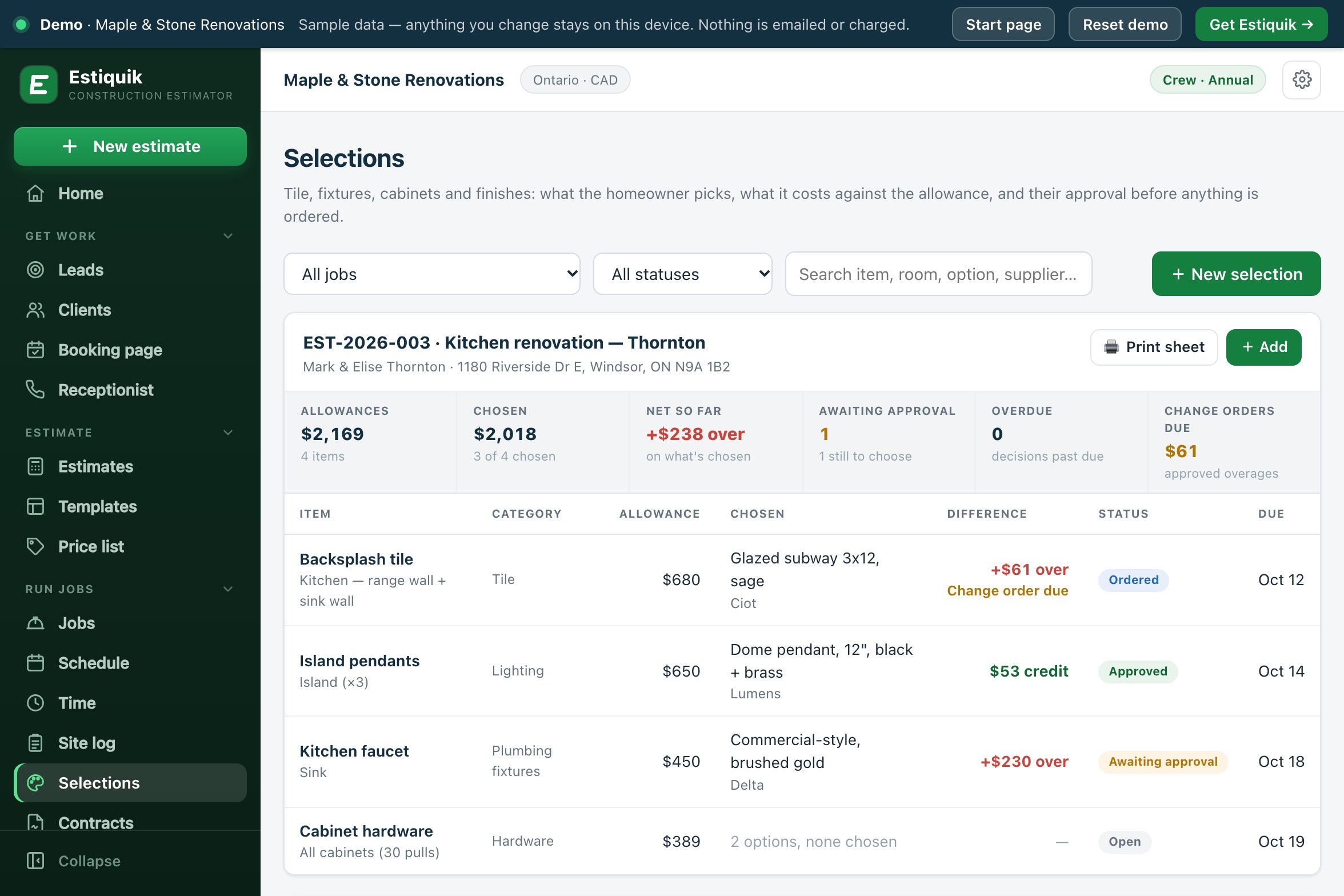
The Estiquik Selections page for the Thornton kitchen: allowances, chosen options, the net difference and change orders due, with backsplash tile ordered at $61 over, island pendants a $53 credit and the faucet awaiting approval at $230 over
Selections in the live demo
Two people holding up tile samples against a kitchen wall
Before anything is orderedThe homeowner chooses against the allowance and approves on their own project page.
Allowance, options, approval

What selections and allowances do

One Selections page per job, with a summary bar: allowances, chosen, net over or under, awaiting approval, overdue and change orders due. The examples are the Thornton kitchen in the live demo.

📥

From the estimate

Any estimate line with allowance in its name can become a selection, at the client's price: cost with contingency and markup. Importing twice adds nothing new.

Four allowances, $2,169
🎨

Options to choose from

Each option has a name, the price to the client, supplier, SKU or model, a product link, notes and a photo, and shows its own difference from the allowance.

Faucet: $680 against $450
➖

Over or under, worked out

The difference is the chosen option's price less the allowance. Over means the client owes more; under is a credit.

Pendants: a $53 credit
✍️

Approved by the homeowner

The homeowner sees the options on their project page, types their name, ticks the box and approves. Name, time, IP address, browser and a fingerprint of what they saw are recorded.

Backsplash: approved in the portal
🔒

No order before approval

Create purchase order stays locked until an option is chosen and approved, and says why. Once approved, it makes a draft PO for the supplier and marks the selection Ordered.

Waiting for the client's approval
🧾

The difference as a change order

After approval, one button creates a draft change order for the overage, or a credit change order for the saving, ready to send for signature.

Open the demo →
Allowance to order

How a selection gets made

Four steps, and nothing is ordered until the third.

STEP 1

Set the allowances

Import the allowance lines from the estimate, or add a selection by hand: item, location, category, allowance and the date the decision is due.

STEP 2

Offer the options

Add two or three options with photos, prices and product links, and leave the selection visible on the homeowner's project page.

STEP 3

Get the approval

The homeowner approves on their project page, or you record an approval given on site, marked as recorded by your team rather than signed by the client.

STEP 4

Order and settle

Create the purchase order for the supplier, and the change order for the difference. Send the change order for signature like any other.

The homeowner's project page is the client portal. Change orders are signed through change orders.

Approval

What an approval records

The same kind of record as the e-signature on estimates, kept on the selection.

What they agreed toThe homeowner ticks a box that names the option, its price and the amount over the allowance that will be added to the contract as a change order, or the credit.
Who, when and from whereThe name they typed, the time from the server, their IP address and their browser.
A fingerprint of what they sawA SHA-256 of the selection: the item, location, allowance, difference and the chosen option's name, supplier, SKU and price.
Cleared if it changesChange the chosen option, the price or the allowance after approval and Estiquik warns you and clears the approval, so it has to be given again.
Selections software pricing

What it costs

Estiquik's own plans, in US dollars with Canadian dollars beside them. Other vendors are not compared on this page: their prices change, and we only list one we have checked on their own pricing page that day.

ProductMonthlyWhat that buys
Estiquik Pro$29.99CA$34.99 · crew hours, job profit, purchasing, subcontracts, selections, the client portal and the site log, with expenses, change orders, contracts, plan takeoff and QuickBooks. Annual $299.99 / CA$349.99.
Estiquik Crew$69.99CA$79.99 · everything in Pro in one workspace for up to 10 people, with team roles. Annual $699.99 / CA$799.99.
Estiquik Starter$19.99CA$24.99 · estimates, invoices and e-signature. No selections.

Full plan details on the pricing page. The 14-day trial is Pro and needs no card.

Where it stops

What selections in Estiquik are

Pick Estiquik if you…

  • Put allowances in your estimatesThey become selections at the client's price, with the difference worked out.
  • Have ordered the wrong faucet beforeNothing gets a PO until the homeowner has approved it.
  • Lose the overage at the final invoiceApproved differences with no change order are counted as change orders due.
  • Want the homeowner to choose at homeThe options, photos and links are on their project page.

Pick a different tool if you need…

  • Change orders created by themselvesThe change order for a difference is one button, but someone with estimates access presses it, and it is a draft until you send it.
  • Supplier costs filled inThe option price is what the client pays. The PO from a selection starts at $0 cost for you to fill in.
  • A product catalogueOptions are what you add: name, price, supplier, SKU, link and a photo.
  • A 3D or room designerSelections are a list with photos, not a design tool.

A list of the decisions a homeowner has to make on a job, each with its allowance, its options and an approval you can show later. It is honest about its edges: a difference over or under needs an approval before its change order can be made, the change order is a draft until you send it, and the PO cost is yours to enter.

Selections are on Pro. On Crew, the page needs the estimates or money switch; making the PO needs money and making the change order needs estimates.

Before you ask

Questions contractors ask

How does the homeowner approve a selection?

On their project page. They see each option with its photo, price and product link and the difference from the allowance, type their full name, tick a box that states the option, the price and the amount over or under, and press Approve this selection. You are emailed when they do.

What is recorded when they approve?

The name they typed, the time, their IP address, their browser and a SHA-256 fingerprint of the selection as they saw it. If the option, its price or the allowance changes afterwards, the approval is cleared and has to be given again.

How is the difference from the allowance worked out?

The chosen option's price to the client less the allowance. A positive difference is an overage the client owes; a negative one is a credit. Allowances imported from the estimate are at the client's price, with contingency and markup.

How does an overage become a change order?

Once the selection is approved, Create change order makes a draft change order for the difference, titled as a selection upgrade, with the chosen option and the allowance in the reason. You send it for signature from Change orders. A saving makes a credit change order the same way.

Can I stop something being ordered before it is approved?

Yes. Create purchase order is locked until an option is chosen and approved, and says which is missing. Once approved, it makes a draft PO for the option's supplier, delivered to the job address, and marks the selection Ordered.

What if the homeowner decides on site?

Record approval takes who approved and how. It is marked as recorded by your team in the app, not signed by the client.

Which plan are selections on?

Pro, at $29.99 a month or $299.99 a year (CA$34.99 / CA$349.99), and Crew. The 14-day trial is Pro and needs no card.

Get the next tile choice approved before it is ordered

Fourteen days of Pro, no card. Import the allowances from the estimate, add the options, and share the project page.

Start free trial — no card required
14-day trial of Pro · Cancel anytime