◆ On Pro · $29.99 a month (CA$34.99) · 14-day trial

Supplier quotes and purchase orders tied to the job they are for.

Ask your suppliers for prices on one list. They answer from a link, without an account, and the answers line up side by side. Award the best one and it becomes a purchase order; log what arrives, record the supplier's bill, and Estiquik checks the bill against what you ordered and received before you pay it.

✓ No card to start✓ Suppliers need no account✓ Bills checked against the PO
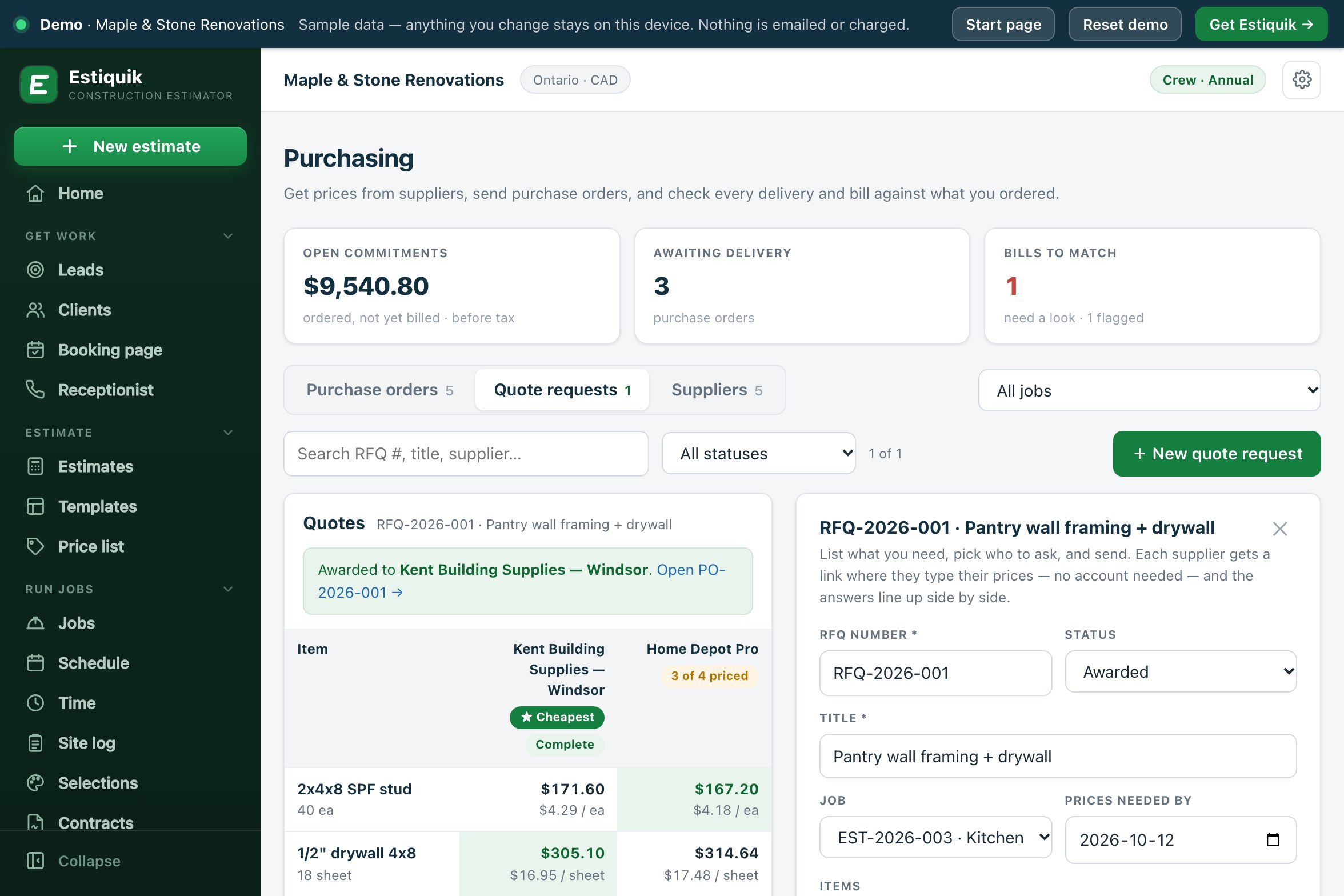
An Estiquik quote request for pantry wall framing and drywall: Kent Building Supplies priced all four lines and is marked cheapest, Home Depot Pro priced three of four, and the request is awarded
A quote request in the live demo
A carpenter carrying wooden boards across a job site
MaterialsSupplier prices side by side, the winner as a purchase order, and the bill checked against what arrived.
Quote, order, receive, match

What purchasing does

One Purchasing page with three tabs: purchase orders, quote requests and suppliers. The examples are the Thornton kitchen in the live demo.

📨

Quote requests from a link

List the items, quantities and units, from your price list or typed in, and send the request to your suppliers. Each gets a private link where they type unit prices, a delivery date and notes.

Viewed and answered, per supplier
⚖️

Prices side by side

The cheapest price on each line is highlighted. Cheapest overall goes only to a supplier who priced every line; a partial quote is marked with how many lines it covers.

Kent, all 4 lines: $579.18
🧾

Award it, get a PO

Award & create PO turns the winning answer into a draft purchase order at the quoted unit prices, numbered PO-2026-001 and up, linked to the job.

Home Depot Pro: 3 of 4 priced
🚚

Deliveries logged

Log what arrived, line by line, or press Everything arrived. The PO moves to Partly received or Received on its own and shows what is still to come.

Cabinets: Partly received
🔍

Bills matched before you pay

Record the supplier's bill against the PO. Ordered, received and billed are compared, and the bill is flagged if it is more than was ordered or more than has arrived.

Open the demo POs →
📈

Committed on the job

An open PO counts as committed on the job until it is billed, then the bill counts as spent, so job profit sees the cost before the invoice arrives.

See job costing →
Request to paid bill

How a material order runs

Four steps, each one a record on the job.

STEP 1

Ask for prices

Create a quote request on the job: items, quantities, units and the date you need prices by. Send it, or copy a supplier's link to text it. A quote taken by phone can be typed in and is marked as such.

STEP 2

Compare and award

The answers line up side by side. Read the delivery dates and notes, then award one. The request is marked Awarded and the draft PO is created.

STEP 3

Send the PO

Check the lines, the tax and the delivery address (filled from the job), then email it to the supplier or print it. It asks the supplier to quote the PO number on the invoice and packing slip.

STEP 4

Receive and match

Log deliveries as they arrive. Record the bill with its tax; it is saved as an expense on the job, linked to the PO, and checked against what was ordered and received.

A selection the homeowner has approved can become a purchase order too: see selections and allowances.

Deliveries and bills

How a bill is checked

Three figures per PO, all before tax: what was ordered, what has arrived (at the PO's own unit costs) and what has been billed.

Billed more than orderedFlagged when the bill passes the ordered value by more than $1 or 2%, whichever is larger.
Billed ahead of deliveryFlagged when the bill is for more than has been received so far. A 50% deposit bill on cabinets that have not arrived shows up here.
Unbilled, part-billed, billedEach PO shows where its bill stands, and the Purchasing page totals what has arrived but not been billed.
Closed when it is doneMark PO closed is offered once the PO is fully received and billed with nothing flagged.
Purchase order software pricing

What it costs

Estiquik's own plans, in US dollars with Canadian dollars beside them. Other vendors are not compared on this page: their prices change, and we only list one we have checked on their own pricing page that day.

ProductMonthlyWhat that buys
Estiquik Pro$29.99CA$34.99 · crew hours, job profit, purchasing, subcontracts, selections, the client portal and the site log, with expenses, change orders, contracts, plan takeoff and QuickBooks. Annual $299.99 / CA$349.99.
Estiquik Crew$69.99CA$79.99 · everything in Pro in one workspace for up to 10 people, with team roles. Annual $699.99 / CA$799.99.
Estiquik Starter$19.99CA$24.99 · estimates, invoices and e-signature. No purchasing.

Full plan details on the pricing page. The 14-day trial is Pro and needs no card.

Where it stops

What purchasing in Estiquik is

Pick Estiquik if you…

  • Buy materials job by jobEvery quote request and PO is on a job, and its cost shows on that job before the bill comes in.
  • Ask two or three suppliers for pricesOne list, one link each, answers side by side.
  • Get billed for things that have not arrivedThe bill is checked against deliveries before you pay it.
  • Keep a price list alreadyQuote requests and POs start from your own price list.

Pick a different tool if you need…

  • A supplier catalogue feed or live dealer pricingQuote requests and POs are priced from your own price list and from what suppliers type in. Nothing pulls in a supplier's catalogue, and nothing orders through a dealer.
  • Line-by-line three-way matchingThe bill is matched on totals before tax, not line by line.
  • Automatic reminders to suppliersEstiquik shows who has viewed and answered a request. Chasing the rest is up to you.
  • InventoryNo stock levels or warehouse counts. A PO with no job is just shop stock on paper.

Quote requests, purchase orders, deliveries and supplier bills for a renovation business, each tied to a job. It is honest about its edges: suppliers answer with unit prices before tax and no tax of their own, unpriced lines go onto the PO at $0 for you to fill in, and matching is on totals.

Purchasing is on Pro. On Crew, it needs the money switch, and emailing a quote request also needs the send switch.

Before you ask

Questions contractors ask

Do suppliers need an Estiquik account?

No. Each supplier gets a private link. They see your list of items and quantities, type their unit prices, a delivery date and notes, and send. They can update their prices until the request is awarded. They never see another supplier's prices.

How are the quotes compared?

Side by side, line by line, with the cheapest price on each line highlighted. Cheapest overall is given only to a supplier who priced every line; a partial quote is labelled with how many lines it priced. The page also shows what splitting the order line by line would cost.

What happens when I award a quote?

Estiquik creates a draft purchase order for that supplier at the quoted unit prices, linked to the job, and marks the request Awarded. You check it, then email or print it.

How does bill matching work?

Record the supplier's bill on the PO: total with tax, tax rate, date, how it was paid and the supplier's invoice number. It is saved as an expense on the job. The PO compares ordered, received and billed before tax, and flags a bill that is more than ordered (by more than $1 or 2%) or more than has been received.

Does it connect to my supplier's catalogue?

No. Items come from your own price list or are typed in, and prices come from what the supplier answers. There is no catalogue feed and no ordering through a dealer.

How do POs show up in job costing?

An open PO's unbilled value counts as committed on the job. Once the bill is recorded, it counts as spent instead. Job profit adds both into the forecast cost.

Which plan is purchasing on?

Pro, at $29.99 a month or $299.99 a year (CA$34.99 / CA$349.99), and Crew. The 14-day trial is Pro and needs no card.

Send the next quote request from the job

Fourteen days of Pro, no card. Add your suppliers, list what the job needs, and let the answers line up.

Start free trial — no card required
14-day trial of Pro · Cancel anytime