Hours on a renovation are the cost that drifts. Estiquik logs them against the job and the task, from a timer on the phone or typed in at the end of the day, costs each hour at the pay rate in force that day plus your employer burden, and sets them beside the hours you quoted, task by task.
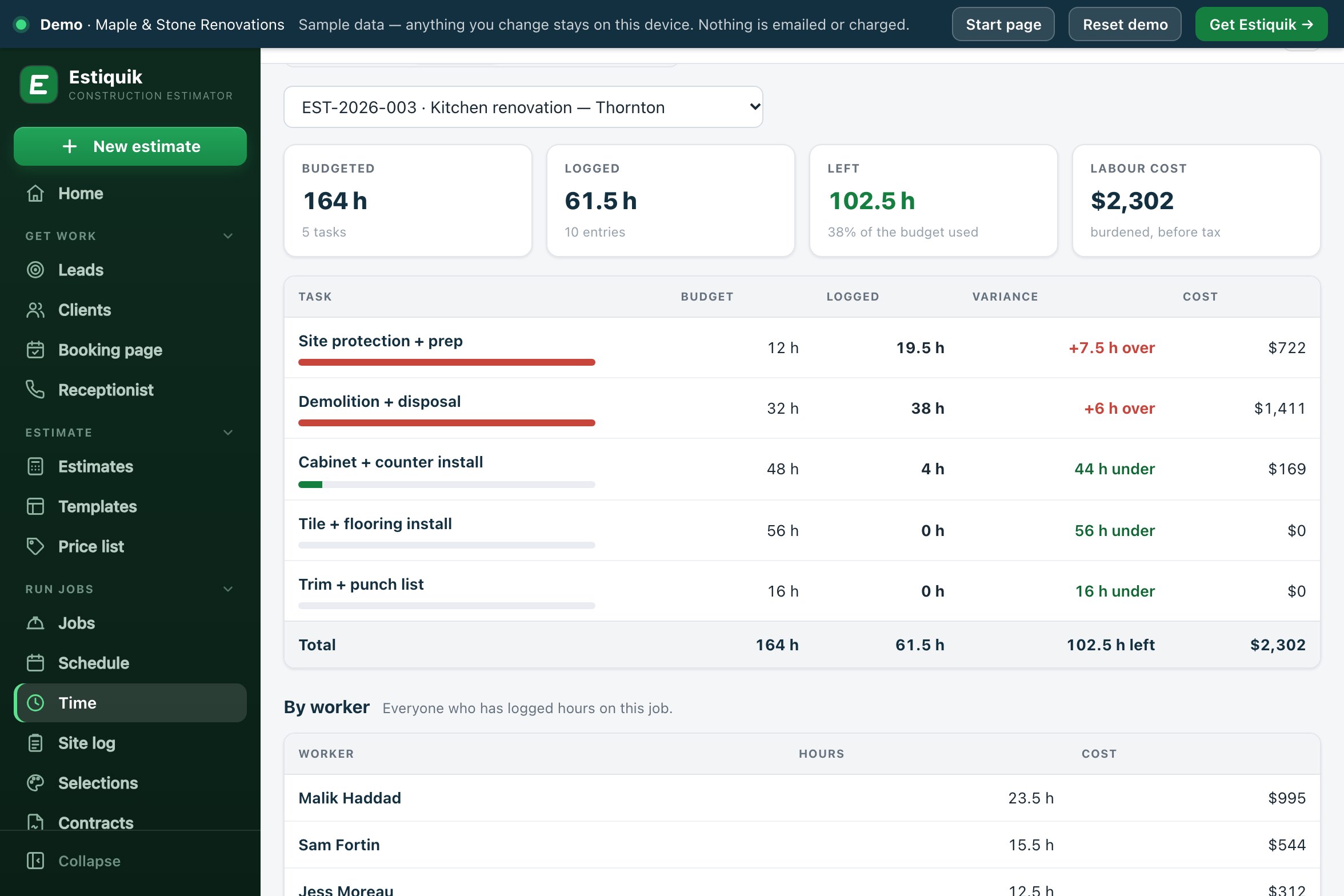
One Time page with three tabs: the week's timesheet, hours by job, and the crew with their pay rates. The examples are the Thornton kitchen in the live demo.
Pick the job and the task and press Start timer. Add a 15- or 30-minute break, stop it at the end of the job. One timer per person, even across two devices.
Hours in quarter-hour steps, or a start and finish time with a break. A shift that runs past midnight works out correctly. Notes go on the entry.
Budgeted hours per task, filled from the hourly labour lines on the estimate or typed in, next to the hours logged, with the variance per task.
Each hour is costed at the worker's pay rate on the day it was worked, times one plus your burden percentage. A raise is a new dated rate; old hours keep the old cost.
Approve an entry or every entry shown. Approval records who and when, and locks the entry for anyone who cannot manage time.
Export the week, or any date range, as a CSV with date, worker, job, task, start, end, break, hours, approved and notes.
Open the demo timesheet →Set the crew up once. After that, every hour lands on a job and a task.
On Crew & pay rates, add each worker with a trade and a dated pay rate: wage per hour and burden percentage. Link a worker to their Estiquik login if they will log their own time.
On the job, press Fill from estimate. Labour lines priced by the hour become budgeted hours per task; lump-sum lines come in with the hours left for you to fill in.
A timer on the phone, or hours typed in, against the job and the task. Hours on a task that is not in the budget still show, as their own row.
Approve the week, export the CSV for whoever runs payroll, and the costed hours count toward the job's spent figure on job profit.
Hours feed job costing: labour is part of spent, and a job is flagged Watch when its hours run more than 10 points ahead of the percent complete you set.
Labour cost is wage plus the employer costs that go with it. Estiquik does the arithmetic; the rates are yours.
Estiquik's own plans, in US dollars with Canadian dollars beside them. Other vendors are not compared on this page: their prices change, and we only list one we have checked on their own pricing page that day.
| Product | Monthly | What that buys |
|---|---|---|
| Estiquik Pro | $29.99 | CA$34.99 · crew hours, job profit, purchasing, subcontracts, selections, the client portal and the site log, with expenses, change orders, contracts, plan takeoff and QuickBooks. Annual $299.99 / CA$349.99. |
| Estiquik Crew | $69.99 | CA$79.99 · everything in Pro in one workspace for up to 10 people, with team roles. Annual $699.99 / CA$799.99. |
| Estiquik Starter | $19.99 | CA$24.99 · estimates, invoices and e-signature. No crew time tracking. |
On Pro the owner logs the crew's hours. On Crew each person logs their own from their own login. Full plan details on the pricing page. The 14-day trial is Pro and needs no card.
A timesheet for a renovation crew: hours on a job and a task, costed at your own dated rates, set against the hours you quoted, and approved by the week. It is honest about its edges: hours with no pay rate cost $0 and the page says so, a lump-sum labour line has no budgeted hours until you type them, and burden is one percentage per rate, not a payroll calculation.
Crew time tracking is on Pro, where the owner logs the crew's hours. On Crew each member logs their own, and team roles decide who can approve hours and who sees pay rates.
From the Time page on a phone: pick the job and the task and start the timer, add a break, stop it. Or add hours by hand, as a number of hours or as a start and finish time with a break. An entry can be up to 24 hours, and a shift past midnight is handled.
At the worker's pay rate in force on the day the hour was worked, times one plus your burden percentage. A $35 wage at 21% burden is $42.35 an hour. Burden is one figure you set to cover CPP/QPP, EI, vacation pay, WSIB/WCB, EHT and benefits; the app does not guess those rates.
Yes. Fill from estimate turns the estimate's labour lines priced by the hour into budgeted hours per task. The By job tab shows budget, logged and variance for each task, and hours logged on a task that is not in the budget show as their own row.
Approve one entry or every entry shown for the week. The approval records who approved and when. An approved entry is locked for anyone who does not have the Manage time switch.
A CSV with Date, Worker, Job, Task, Start, End, Break (min), Hours, Approved and Notes, for the week shown or for any date range you choose.
No. There is no GPS and no geofence. Hours come from the timer or are typed in.
Pro, at $29.99 a month or $299.99 a year (CA$34.99 / CA$349.99), where the owner logs the crew's hours. On Crew, at $69.99 a month (CA$79.99), each person logs their own from their own login. The 14-day trial is Pro and needs no card.
Fourteen days of Pro, no card. Add the crew and their rates, fill the budget from the estimate, and start the timer on site.