◆ On Crew · $69.99 a month (CA$79.99) · up to 10 people

Team roles that give each person what their job needs, and nothing more.

An estimator who never sees invoices. A foreman who runs the site without seeing margins. A sub who sees the schedule and the site log, and not your client's phone number. Give each person a role, adjust the eight switches if you need to, and the database enforces it, not just the screen.

✓ Five roles, eight switches✓ Enforced by the database✓ Up to 10 people
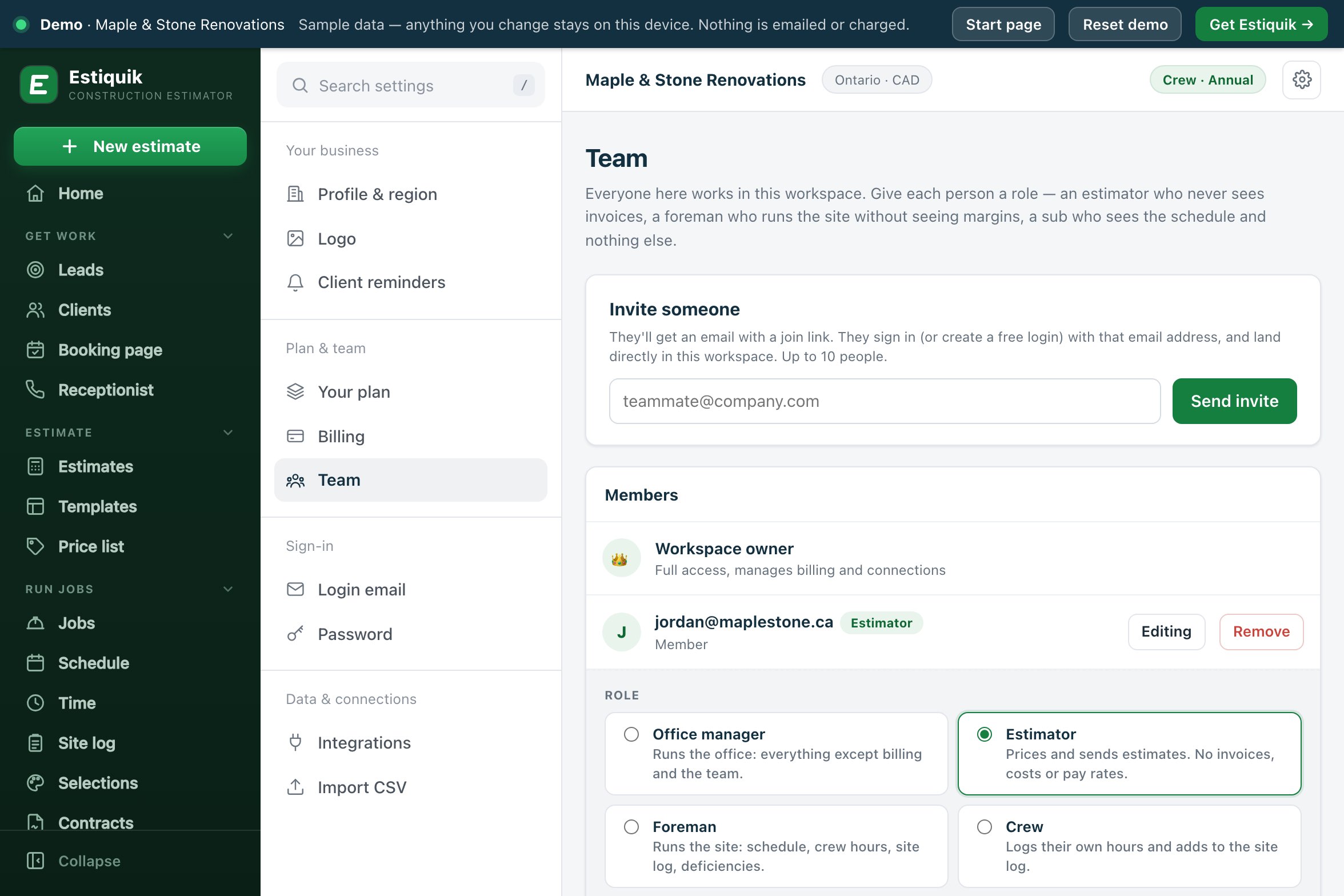
The Estiquik Team page: invite someone, the members with their roles, and the Access panel open on an estimator with the office manager, estimator, foreman and crew roles to choose from
Team roles in the live demo
Three people in hard hats going over plans in a new room
The whole crewOffice, estimator, foreman, crew and subs each see what their job needs, and nothing more.
Five roles, eight switches

What each role starts with

Everyone in the workspace sees jobs, the schedule, the site log and deficiencies, and logs their own time. The owner keeps everything and is the only one who manages the team and billing.

🗂️

Office manager

Runs the office: everything except billing and the team. All eight switches on.

Money, estimates, margins, rates, discounts, send, time, contacts
📐

Estimator

Prices and sends estimates. No invoices, costs or pay rates.

Estimates, margins, send, contacts
👷

Foreman

Runs the site: schedule, crew hours, site log, deficiencies.

Time, contacts
🔨

Crew

Logs their own hours and adds to the site log.

Contacts
🔌

Subcontractor

Sees the schedule, site log and deficiencies. No client contacts.

No switches
🎚️

Then adjust it

Tick or untick any switch for one person. A switch that differs from the role is marked changed from role, and picking a role again resets them.

Open the demo team →
Invite to access

How a person gets their access

Set once per person, changed whenever their job changes.

STEP 1

Invite them

Type their email and press Send invite. They get a join link, sign in or create a free login with that address, and land in your workspace. You can also copy the link.

STEP 2

Pick a role

Open Access on the member and choose office manager, estimator, foreman, crew or subcontractor. The switches fill in from the role.

STEP 3

Adjust the switches

Turn on Send to clients for a foreman who emails quotes, or turn off See margins for an estimator. Save access.

STEP 4

They see their pages

Pages they cannot use are hidden from their menu. Typing the address shows that the page is not part of their access, and the database refuses the data anyway.

A member who joined before roles existed keeps full access, shown as a Full access chip, until you pick a role for them.

Where it is enforced

The eight switches, and what checks each one

Most switches are enforced by the database rules, so a page cannot get round them. Two live inside the estimate document and are enforced by the app.

By the databaseMoney (invoices, payments, expenses, job profit, purchasing, subcontracts, pay rates), Estimates and clients, Edit rates, Manage time and schedule, and Client contacts.
By the serverSend to clients: emailing estimates and invoices, signing links, the client portal and bid invites is checked in the functions that send.
By the appSee margins and Approve discounts act inside the estimate, which the rules cannot see into. Without Approve discounts, an estimate below your minimum markup or with a discount line waits for approval.
Owner onlyBilling, inviting and removing people, setting roles and the minimum markup.
Team plan pricing

What it costs

Estiquik's own plans, in US dollars with Canadian dollars beside them. Other vendors are not compared on this page: their prices change, and we only list one we have checked on their own pricing page that day.

ProductMonthlyWhat that buys
Estiquik Crew$69.99CA$79.99 · everything in Pro in one workspace for up to 10 people, with team roles. Flat price, not per seat. Annual $699.99 / CA$799.99.
Estiquik Pro$29.99CA$34.99 · one login. Annual $299.99 / CA$349.99.

The 14-day trial is Pro; teams and roles start when you move to Crew. Full plan details on the pricing page.

Where it stops

What team roles in Estiquik are

Pick Estiquik if you…

  • Have an office manager or an estimatorThey get the estimates and the clients, not the pay rates.
  • Send a foreman to run the siteThe schedule, the crew's hours and the site log, not the margins.
  • Let subs log their hours and the site logThey see the jobs and the schedule, never the client's contact details.
  • Want the limits to holdThe database refuses the data, not just the screen.

Pick a different tool if you need…

  • Roles you name yourselfThere are five roles. Each person's switches can be changed, but you cannot add a sixth role.
  • More than 10 peopleCrew is up to 10 people, including pending invites.
  • Margins hidden at the database levelSee margins is enforced by the app. Someone with estimates access can read the estimate document itself.
  • Permissions per jobAccess is per person across the workspace, not per job.

Five roles and eight switches per person, enforced by the database rules wherever the data sits in its own collection, by the server for sending, and by the app for margins and discounts. It is honest about its edges: the two app-enforced switches act inside the estimate, which the rules cannot see into, and everyone sees jobs, the schedule, the site log and deficiencies.

Team roles are on Crew, at $69.99 a month (CA$79.99) for up to 10 people.

Before you ask

Questions contractors ask

What roles are there?

Office manager (everything except billing and the team), estimator (estimates, margins, sending and client contacts), foreman (crew hours, the schedule and client contacts), crew (logs their own hours and adds to the site log) and subcontractor (sees the schedule, site log and deficiencies, with no client contacts).

What are the eight switches?

Money, Estimates and clients, See margins, Edit rates, Approve discounts, Send to clients, Manage time and schedule, and Client contacts. Each role turns some on; you can change any of them for one person.

Is it just hiding buttons?

No. Money, estimates, rates, time and contacts are enforced by the database rules: a member without money cannot read an invoice, whatever the page does. Send to clients is checked by the server functions that send. See margins and Approve discounts are enforced by the app, because they act inside the estimate document.

What happens to people already on my team?

Members who joined before roles existed keep full access, shown as Full access on the Team page, until you pick a role for them. Nobody loses anything on the day.

What does a sub see?

The jobs, the schedule, the site log and the deficiency list, without client names or contact details. They log and edit their own hours until they are approved and write site log entries as themselves.

What can only the owner do?

Billing, inviting and removing people, setting roles and switches, and the minimum markup. A member can only remove themselves.

Which plan are team roles on?

Crew, at $69.99 a month or $699.99 a year (CA$79.99 / CA$799.99), for up to 10 people at a flat price. The 14-day trial is Pro.

Give the next person on your team the right access

Start with fourteen days of Pro, no card. Move to Crew when you are ready to bring the team in.

Start free trial — no card required
14-day trial of Pro · Cancel anytime